Drawing a line of text
The presenter widget, the rich-text markup it draws with, and the style table that decides what a mention or a heading looks like.
All documentation — Reference
Start here
Concepts
Authoring for a build
Playing a story
The generated assets and code
The plugin and sync
On this page
A field holds one of three things, and each needs a different conversion. Getting that wrong is the single most common way a line comes out damaged, so start at the end: the presenter widget already decides for you.
The presenter widget
TaleShardPresenterWidget is the base a game’s dialogue screen derives, with the rich-text plumbing
already wired. Derive it as a Widget Blueprint and place three named widgets — the Blueprint fails
to compile naming whichever is missing:
| Named widget | Type | What the base does with it |
|---|---|---|
Prose | Rich Text Block | the story prose, drawn as UMG rich text |
Status | Text Block | what the story wants from the player: Continue, Choose, The End |
Choices | any panel | where the choice buttons go. Emptied by Set Step; filled by your derived widget from the step’s choices |
Two more are optional — place them and the base fills them, leave them out and nothing complains:
| Optional widget | Type | What the base does with it |
|---|---|---|
Speaker | Text Block | the speaking character’s current name; collapsed on a step nobody speaks |
Continue | any widget, usually your Advance button | shown only while the step waits to be advanced; collapsed on a choice and at the end |
Then call Set Step from your On Step Presented handler with the session and the step. The prose
and the status are drawn; the choice buttons are yours, into Choices.
| Member | |
|---|---|
| Set Step | draw a step: the presented fields as prose, the status line, the speaker’s name and the Continue widget’s visibility when those are placed, and an emptied choice panel. The session may be empty, in which case a mention and the speaker fall back to the name the author saw |
| Clear Step | blank the screen: no prose, no status, no speaker, no choices, Continue collapsed |
| Get Prose Markup | the step’s presented fields as one run of markup, one paragraph per field — for a presenter that draws the prose somewhere else |
| Get Field Markup | one field as markup: its rich text when it has any, otherwise its plain text escaped |
| Describe Status | the status line for a step. Override it to change the wording, or to draw nothing |
| Get Mention Glyph | what to draw in place of a mention, as markup — empty, the default, draws the name. Override it to draw the player’s binding for an input action; see an input action’s glyph |
| Text Style | how mentions, interpolations and marks are drawn |
| Style Table | the rich-text style rows, keyed by the semantic names the markup emits. Empty means the default table built here |
| Get Style Table, Get Default Style Row Names | the table in use, and the row names a custom table must cover |
Get Field Markup picks between the three. That is its whole job, and it is why it exists rather than being two nodes at the call site.
The dialogue screen
The plugin’s own screen, TaleShardDialogueScreen, derives the presenter widget and does the rest
by itself once it is bound to a TaleShard Player component: the typewriter, the choice buttons, the
portrait, the voices, the history and the keys. It is what the TaleShard Story actor draws with,
and its Create New button makes a Widget Blueprint of your own laid out like it — see
Build your first story in Blueprints.
Its optional widgets are Portrait (an Image), History (a Scroll Box) and HistoryFrame, beside
the presenter’s own.
A screen of your own, from scratch
To draw everything yourself, set the TaleShard Story actor’s Dialogue Screen Class to None, or put a TaleShard Player component on an actor of your own. Make a Widget Blueprint whose parent is TaleShard Presenter Widget, place the named widgets above, and wire its Continue button’s On Clicked to Advance on the component.
In the component’s On Step Presented (Session, Step):
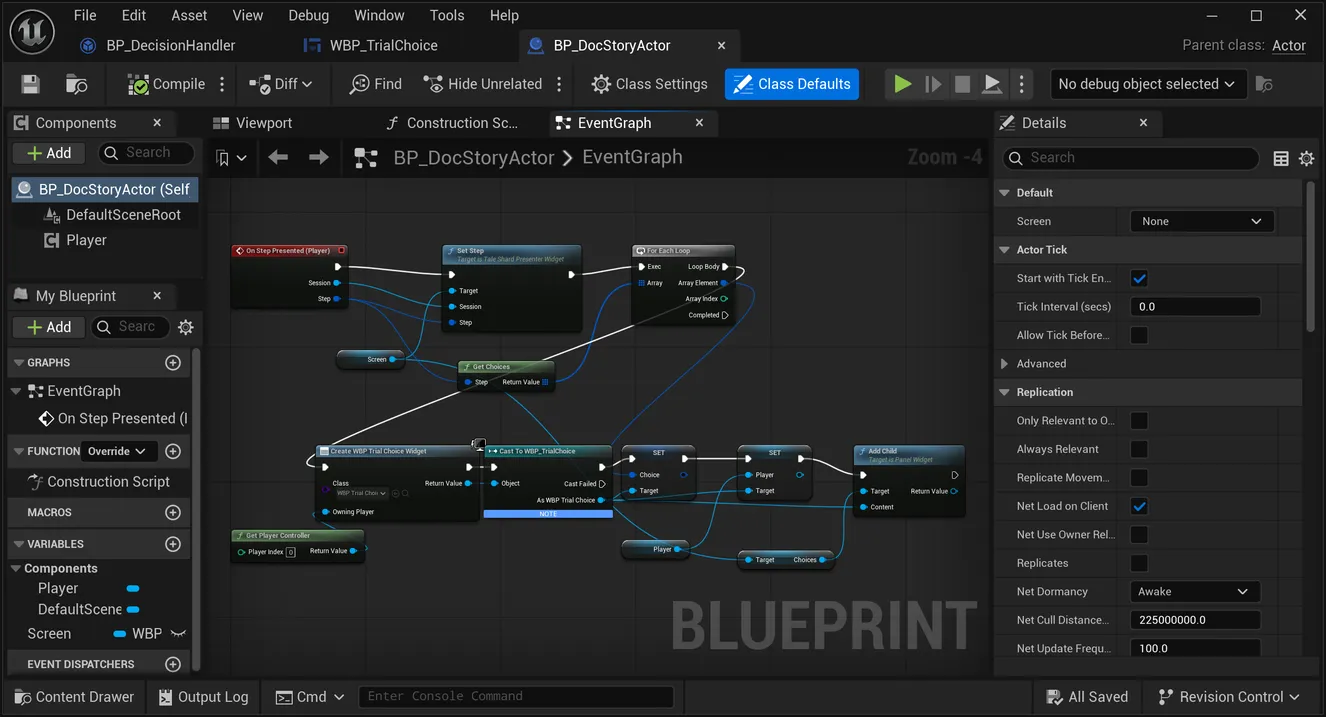
- Set Step on your screen, with the Session and the Step. It fills Prose, Status and Speaker, shows or hides Continue, and empties Choices.
- For Each over Get Choices (Step): Create Widget of your choice button, set its Choice to the array element and its Player to the component, and Add Child it to the screen’s Choices panel.
The choice button is a widget with a Button and a Text Block and two variables, Choice and Player:
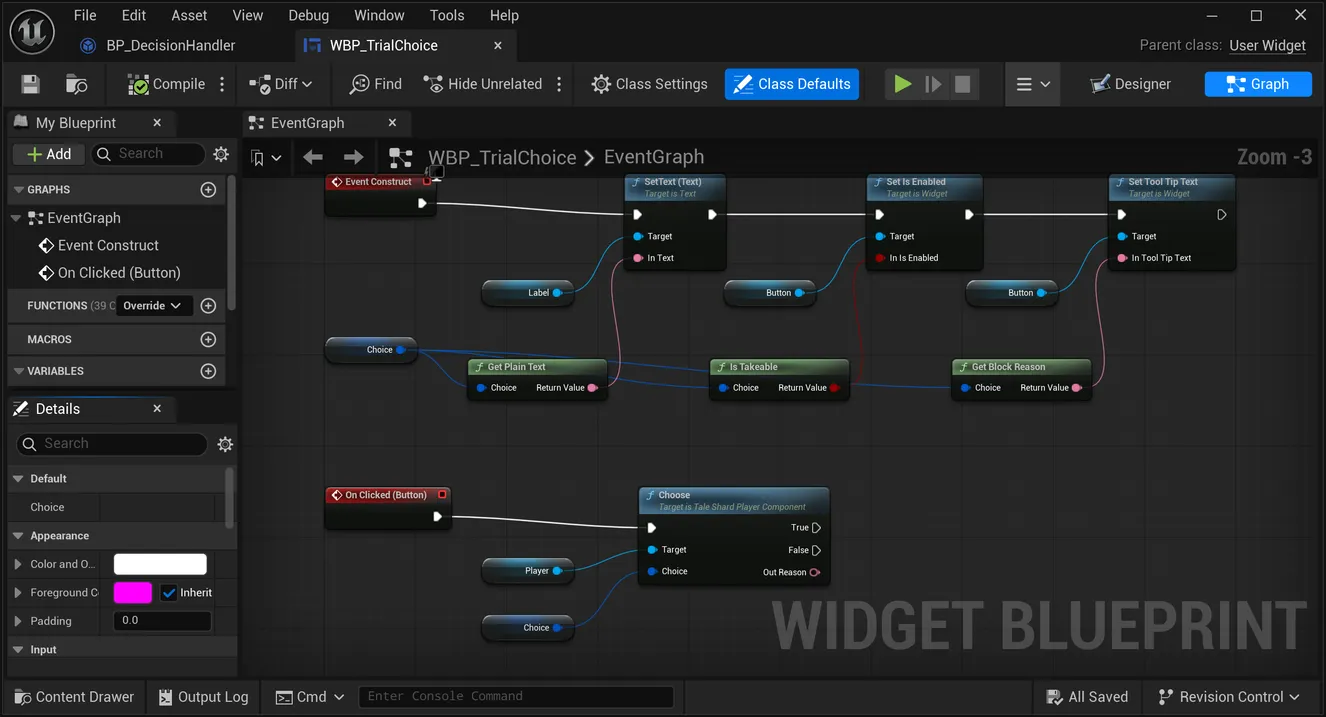
- Event Construct → Set Text on the label from Get Plain Text (Choice) → Set Is Enabled on the button from Is Takeable (Choice) → Set Tool Tip Text on the button from Get Block Reason (Choice).
- On Clicked (Button) → Choose on Player with the Choice.
A locked choice the player can press is a broken button: Is Takeable and Get Block Reason exist for exactly this. For the speaker’s portrait, see entity display.
The markup
The plugin turns the payload’s rich text into UMG rich-text markup: a run is <Row>text</>, and
the closing tag is literally </>. Runs do not nest, so a span wearing several marks gets one
composed row name — TaleShard.Bold, TaleShard.Bold.Italic, TaleShard.Heading1.Bold — in a
fixed order. A mention is <TaleShard.Mention id="…" color="…">name</>, a link
<TaleShard.Link href="…">text</>, a highlight carries its colour.
Three attributes carry a VALUE rather than a mark. color is the highlight behind the text,
textcolor is the colour of the letters, and size is the font size the author set — a CSS length
with its unit, 18px. A span can wear all three at once, which is why they are not one attribute.
None of them is a mark, so none composes a row of its own: a span carrying only a text colour or
only a size is drawn as <TaleShard.Text textcolor="…" size="…">text</>, the plain row, which
exists for exactly that case.
A size is passed through, never converted. What 18px should mean against your own typography
is your decorator’s answer, so the plugin hands you the author’s number and stops. A size in a unit
UMG cannot express is still on the span as FontSizeCss; it just does not become an attribute.
What each row looks like is the style table, never the markup. A presenter’s table answers the
rows it cares about; an unknown row draws in the default style, so a table that covers only
Default, TaleShard.Bold and TaleShard.Mention is a working table. Default is the one row a table
cannot leave out: a Rich Text Block draws untagged prose with it, and a table
without it draws every plain line with no font, as empty boxes.
A mention draws with the entity’s current name and colour, resolved through the session’s entity palette by the entity’s id. A mention’s fallback chain, in order: omit it if the style says so; use the authored label if the style says so; otherwise resolve by id — drawing the look’s glyph instead of any name when it has one — then the authored label, then the span’s own text.
An input action’s glyph
A record can be an input action: its entity definition says a mention of it draws as a keycap
(mentionLook in the payload, FTaleShardEngineEntityDefinition::MentionLook in C++). The record’s
code is the action’s code — the name your game maps to one of its own input actions, Crouch to
IA_Crouch — and its name is the action’s label. A writer’s Hold @Crouch to get under the pipes
should show the key or button the player has bound to crouch, and only your game knows that: the
binding changes with a rebind, a device and a platform, so TaleShard never stores one.
The entity palette’s Resolve Mention marks such a mention — Is Action on the display, with the
action’s code in Code — and the look built from it carries the same, as bIsAction and ActionCode
on FTaleShardMentionLook. The look’s Glyph is left empty, and it is yours to fill:
- The presenter widget asks Get Mention Glyph for every mention it resolves. Override it: when
the mention’s Is Action is set, look up the player’s current binding for its Code and answer the
UMG image decorator’s inline form,
<img id="…"/>, naming the row of your icon table for that key — and add that decorator toProse’s Decorator Classes. Answer empty for anything else. - In C++, outside the presenter, your
ResolveMentioncallback toFTaleShardRichTextMarkup::Formatbuilds the look withFTaleShardRichTextMarkup::MentionLookOf(Display)and setsGlyphwhenbIsActionis set. - Answered every time it is asked. The formatter asks each time it draws, so the glyph is the binding now: a rebind, a pad plugged in or a switch to touch reaches the next prompt drawn. Keep nothing cached.
- Drawn in place of the whole mention. A glyph replaces the name and the colour both, with no run around it, because UMG runs do not nest.
- Written as it came. A glyph is host markup, never project data, so it is inserted as it stands rather than escaped.
- A record’s name is still escaped exactly as before. An action with no glyph draws its name as any mention does, and an action with a glyph never lets its name reach the markup at all.
Text Style
Every member has a default, so an untouched style is a working style.
| Member | Default | |
|---|---|---|
| Mention Fallback Color Hex | #D9D9D9 | what a mention falls back to when its entity has no colour |
| Mentions | Resolved | |
| Interpolations | Value | |
| Bold Mentions | on | the bold mention row rather than the plain one |
| Heading Size Percent | 160, 140, 120 | levels 1, 2 and 3, as a percentage. UMG markup carries no size; a presenter that builds its heading rows from a base style reads these |
| Use Native Underline | on | whether an underline mark is emitted at all |
How a mention is drawn:
Resolved | the entity’s current name, from its id. The default |
Authored Label | the label the author saw when they inserted it. Goes stale on a rename — pick it only when reproducing an authored snapshot |
Omit | draw nothing |
How an inline expression is drawn when its value is not available:
Value | the expression’s source alone, without braces. The default |
Braced | the source wrapped in braces, as the author wrote it |
Omit | nothing |
The style table
A Data Table of Rich Text Style Rows. Leave Style Table empty and the widget builds a default one, in the engine’s own font, covering every row the markup can emit; assign your own to restyle everything without touching the markup. The default table draws at 14 point in white, sized for the plugin’s own dialogue screen. A UMG Text Block starts at 24 point, so a screen of your own whose speaker and status are left at that size draws them larger than the prose: size them to match, or assign a table. Get Default Style Row Names lists the names a custom table should cover.
Underneath: the parsed story text
For a host that draws prose some other way — a 3D text component, a typewriter effect, a transcript — the rich text is also available as structure. The engine parses the payload’s HTML into blocks and spans your code can act on, and the parse never fails: an element it does not recognise keeps its children and drops the wrapper, because a line that draws plainly is better than a line that does not draw.
| a block | Paragraph, Heading, List Item or Code Block, with a heading’s level and the author’s alignment |
| a span | one run of text wearing one set of marks: bold, italic, strike, underline, highlight, subscript, superscript, code, mention, interpolation, link — with a highlight’s colour, a link’s target, a mention’s entity id and authored label, and an inline expression’s source |
Parse once, format at runtime. What a mention or a heading should look like is a per-game answer, so this model carries structure and marks, never presentation.
An interpolation arrives filled. In every field and choice the engine resolves, a {…} chip’s
text is already its value — Get Plain Text, the markup and every accessor read the filled text, and
a field whose only content is a chip that comes out empty counts as empty. The span still carries
the expression’s source, its expression id, and its kind (variable or expression), so a host
can style a value as one. A chip that cannot be worked out shows its literal {source} and is
reported as interpolation-failed. The style’s Interpolations setting applies only to a chip the
engine did not fill — rich text a host parsed on its own.
This half lives in the engine module and is C++ only. The widget and the markup are the Blueprint face over it.