Boards and the canvas
What a board is, how one reaches another, the node and edge records underneath, and the complete table of canvas gestures and shortcuts.
All documentation — Boards and the canvas
Boards and the canvas
The node builder
Modelling the world
Variables, logic and commands
Voice and audio
AI
Working together
Project settings
On this page
The Node Editor section, Ctrl+1. Its side drawer is titled Boards; the surface beside it is
the canvas.
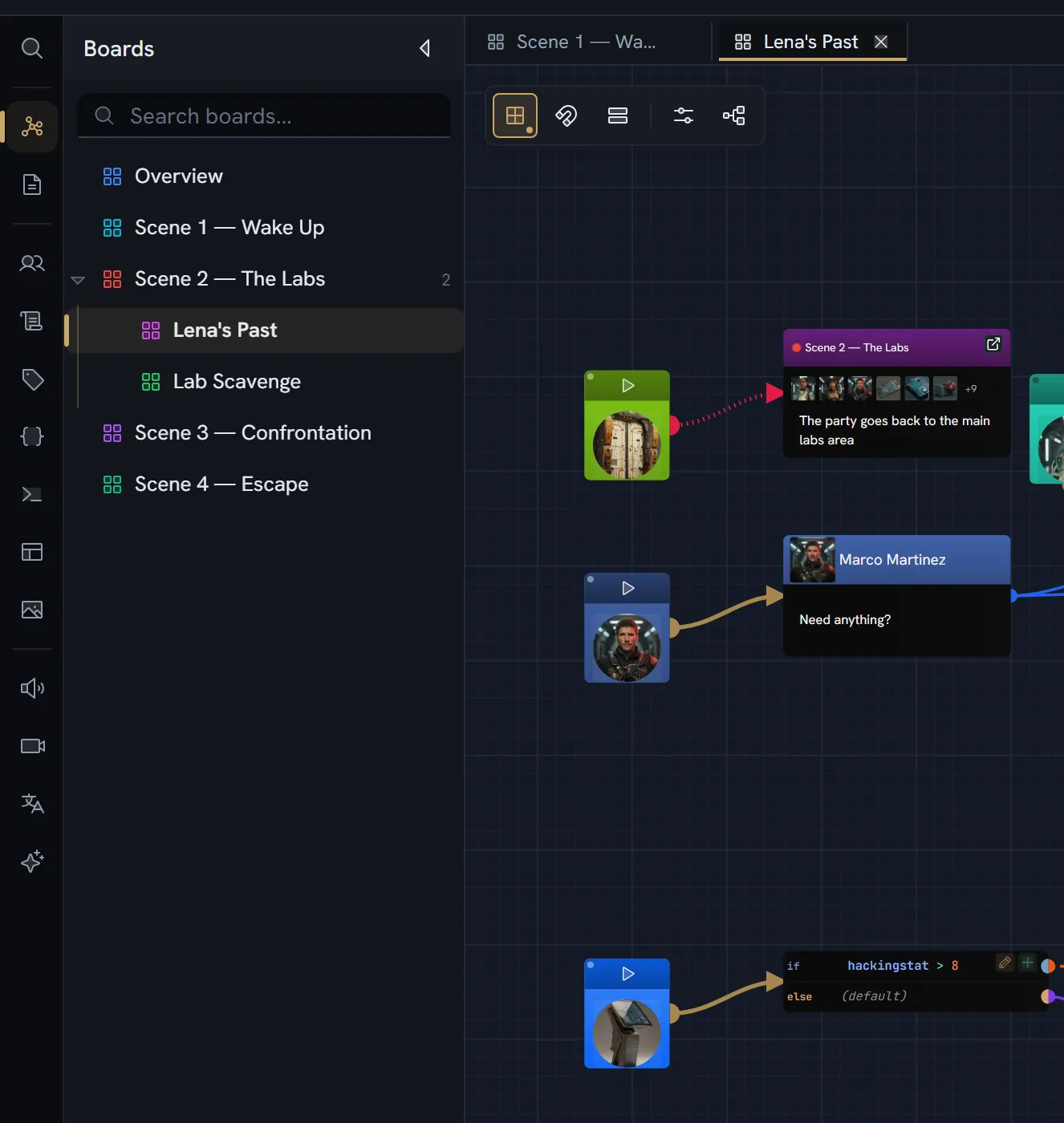
What a board is
A board record is deliberately small:
| Field | Type | Required | What it is |
|---|---|---|---|
id | string | Yes | |
name | string | Yes | 1–100 characters |
type | "board" | Yes | Distinguishes it from a folder in the same tree |
description | string | ||
color | string | ||
parentId | string or null | Yes | Another board, a folder, or the root |
order | number | Yes | Position among its siblings |
tagIds | string[] | ||
startNodeId | string | Where a playthrough of this board begins | |
createdAt · updatedAt | number | Yes | Epoch milliseconds |
createdBy | string | Yes |
A folder is the same shape minus the board-specific fields, with type: "folder". Boards and
folders share one tree, so a board may be nested under either.
startNodeId is optional in a way worth knowing: leaving it unset keeps the derivation — a root
node with an outgoing edge — and an id pointing at a node that no longer exists is treated as
nothing declared rather than as an error.
Where the content lives. The board records are one collection; the nodes and edges are another, keyed by board id. That separation is what lets one canvas be re-pointed at a different board instead of being torn down and rebuilt, and it is why a board tab renders no content of its own.
The tree
Right-click in the drawer: New Board, New Folder, Rename, Edit (boards only — name, description, colour, tags), Delete. The delete dialog reports how many nodes, edges and child items go with it.
Single-click a board opens it as a preview tab; double-click opens it for keeps — and on a board that has children, the double-click opens it rather than merely expanding the row.
Reaching another board
Three separate mechanisms, and they do different things.
Nesting
parentId. This is organisation — where a board sits in the tree. It has no effect on the story’s
flow.
The Board node
A node whose type is Board: runs another board, then continues here — with the entities it contains. Its header field is a board reference marked as a jump target, and it carries a header action labelled Open board. Its body lists up to six of the referenced board’s entities, plus a description.
The Jump node
A node whose type is Jump: continues the flow at another node. Its field is a node reference, also a jump target, and the target may be on any board.
A Jump node can be connected into but never out of — its connection policy is can receive, cannot initiate, single output. A drag from one does not start a wire, and no message is shown.
Nodes, edges and exits
A node
| Field | Type | Notes |
|---|---|---|
id | string | |
type | string | The node type’s code |
position | {x, y} | World coordinates |
data | object | The node’s field values, shaped by its node type |
width · height | number | Optional; some types are fixed-size |
parentId | string | Set when the node is inside a group |
sourcePosition · targetPosition | Which side its ports default to |
An edge
| Field | Type | Notes |
|---|---|---|
id | string | |
source · target | string | Node ids |
sourceHandle · targetHandle | string | Which port on each end |
pathStyle | bezier · straight · step · smoothstep | |
color | string | A hex value, or source-node to inherit |
thickness | number | |
animated | boolean | |
markerStart · markerEnd | Arrowheads | |
waypoints | {x, y}[] |
An edge also carries its condition, as collaborative text on the edge itself. Whitespace alone counts as no condition for the purpose of showing the “this exit is gated” affordance.
An exit
An exit is what the story actually follows, and it is computed from a node’s type and data rather than stored:
| Field | Meaning |
|---|---|
portId | Which port it leaves by |
gate | The condition, or null for ungated |
content | The field slots shown for it. Empty content means a branch, not a player choice. |
repeater | Set when the exit came from a repeater block, with the instance and index |
exitKind | offer · branch · continue · display |
whenBlocked | show or hide. Default: show |
label | The handle’s own label, when it has one: the option’s words when neither the exit’s cells nor the edge’s label give any. It never makes an exit an option |
Connection policy
Every node type declares three things:
| Field | Values | Meaning |
|---|---|---|
canReceive | boolean | May be the target of an edge. An Entry node cannot. |
canInitiate | boolean | May be the source of an edge. A Jump node cannot. |
outputCapacity | unlimited · single · per-port | unlimited for dialogue, per-port for a branch (one output per condition port), single for everything else |
A node type declaring canReceive: false is what makes it an entry node, which is also what
makes it selectable in Game Start.
The node types a new project starts with
| Type | Description |
|---|---|
| Text | A free-form text card |
| Board | Runs another board, then continues here — with the entities it contains |
| Dialogue | A line of dialogue spoken by an entity |
| Entry | Where a conversation starts |
| Branch | Splits the flow down the first matching condition |
| Jump | Continues the flow at another node |
| Element | A media or entity element |
| Code | Runs an expression when the flow reaches it |
All eight appear in the canvas’s palette — the radial menu and the toolbar — on a new project. More premade types, such as the Exchange (a run of lines between several characters, played as one moment) and the Interaction (an Entry and a Branch in one card, where a conversation begins), are added from the Library. Every one of them is project data you can change. See the node builder.
A group — the named, collapsible frame you make with Ctrl+G — is not on the list: it is built
into the canvas rather than being a node type, so there is nothing about it to edit in the builder.
Writing in a node
Every text field on a node is a real editing surface, not an input box — bold, italic, underline and links, sized to your text rather than clipping it, and holding your cursor position while somebody else edits alongside you.
Two characters put something live into the prose, and they are different keys for different things:
| Type | You get | What is stored |
|---|---|---|
@ | A character, item or location — anything that is an entity | The entity’s id, plus a copy of its name |
{ | A variable or an expression, resolved when the story runs | The variable’s id and its code |
An @ mention is an atom: one indivisible thing you select and delete in a single press, not a
run of text that can be half-deleted into nonsense. So is a { interpolation — which is why a
literal { you type yourself survives untouched beside one.
{ is the variable trigger, not @. They are separate mechanisms: a mention points at a thing in
your world, an interpolation is a value at play time. See
variables.
Moving around
Gestures
| Gesture | Effect |
|---|---|
| Middle-drag, anywhere including over a node | Pan |
Space + left-drag | Pan — the trackpad fallback |
| Left-drag on empty canvas | Marquee select |
Shift + left-drag | Add to the selection |
| Left-drag a node | Move the whole selection |
Shift + click a node | Toggle it in the selection |
| Click a node | Select just it |
Shift while resizing | Lock the aspect ratio |
Shift while rotating | Snap the angle |
| Mouse wheel | Zoom about the cursor |
| Right-click empty canvas | Radial menu — create a node there |
| Drop a dragged connection on empty canvas | Radial menu — creates the node and the edge, as one undo step |
| Drag an edge endpoint to empty canvas | Radial menu — creates a node and re-attaches, as one undo step |
| Drag from the palette bar | Create a node at the grid-snapped drop point |
| Double-click an edge | Edit its label |
| Right-click an edge | Path style, thickness, colour, delete |
| Drag near a pane edge | Auto-pan — a 40px band, except during a marquee |
This is deliberately the convention Blender, Unreal and Unity share: middle-drag pans, left-drag selects.
A marquee counts an edge when its path enters the box, not only when the whole edge is inside; and a drag that starts inside a group frame but outside its grab handle counts as background, so a marquee can begin inside a group. A drag under 5 pixels is a click, not a box.
Shortcuts
With the canvas focused and no text field active:
| Keys | Action |
|---|---|
Ctrl+C | Copy |
Ctrl+X | Cut |
Ctrl+V | Paste, centred on the cursor |
Ctrl+D | Duplicate at the cursor |
Ctrl+A | Select all |
Ctrl+G / Ctrl+Shift+G | Group / ungroup |
Ctrl+0 | Reset the selection to automatic size |
Delete / Backspace | Delete |
Escape | Clear the selection |
Shift+1 | Fit every node in view |
| A letter, digit or symbol, one node selected | Start typing in the node’s first text field |
G | Toggle grid snapping |
S | Toggle edge spacing |
With exactly one node selected, typing goes into that node: its first editable text field opens
with your character in it, so G and S type letters instead of toggling. With no selection or
several nodes selected, they toggle as listed. A single click on an empty text field (one still
showing its placeholder) also starts editing it; a field with text opens on a double-click.
Zoom, grid and the minimap
| Zoom range | 12.5% – 200% |
| Zoom step used by fit and focus | 12.5%, so text stays crisp |
| Wheel | Continuous, about the cursor |
| Grid | Two levels, the coarse one every fifth line; it fades out as you zoom away |
| Below 40% zoom | Nodes render as shells rather than full content |
| Minimap | Bottom-left, 200×150, pannable and zoomable, with a Fit all nodes in view button |
| Viewport | Saved per project and per board, so a board reopens where you left it |
There is no keyboard shortcut for zoom. Fit-view is the minimap’s corner button, or Shift+1 with
the canvas focused.
A read-only collaborator keeps pan, zoom and select, and loses drag, resize, connect, reconnect and rotate.
Limits
Nothing enforces a cap on boards, nodes or edges per project — no guard reads one, and no such number is published. The only limit a large project meets is storage per project, which counts the collaborative snapshots of your boards as well as your media. That figure is per plan and lives on the pricing page.
What breaks
| Situation | What you see |
|---|---|
| A board name is empty | Board name cannot be empty |
| A board name is over 100 characters | Board name must be 100 characters or less |
| Dragging an edge out of a Jump node | No wire starts; no message is shown |
| A Board or Jump node with no target set | The Open board action does nothing |
| An automatic exit’s gate is present but blank | The exit fails, and the next exit is tried |
| An offered exit’s gate is present but blank | No condition: the option is offered and can be picked |