Localization
The translation round trip — Excel and XLIFF, exactly what is translatable, the placeholder rules, and every message a bad import produces.
All documentation — Getting it out
Boards and the canvas
The node builder
Modelling the world
Variables, logic and commands
Voice and audio
AI
Working together
Project settings
On this page
The Localization section, Ctrl+9. Its list on the left is three pages, and clicking one
opens it as a tab: Export & Import (boards and entities), Strings (keyed string resources)
and AI batch translation (the AI pages). There is no search box; the list is
only those three rows.
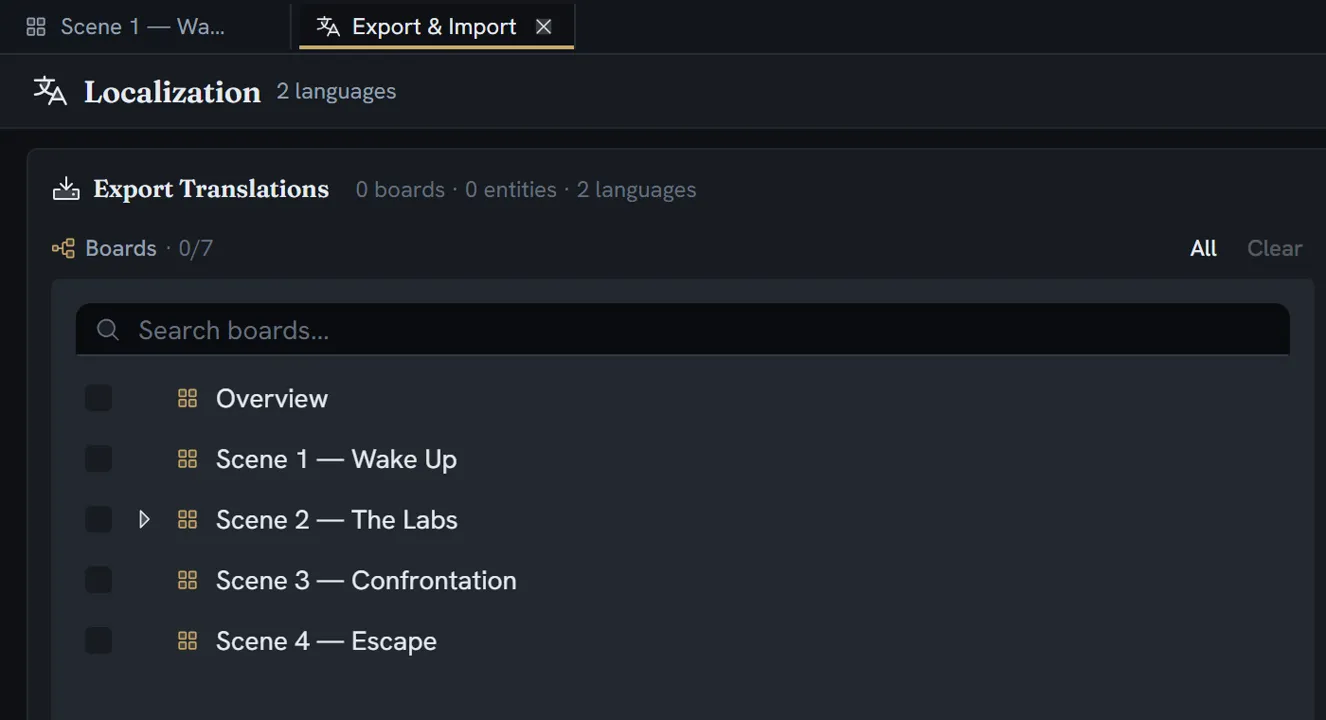
Languages themselves are configured elsewhere — project settings → the Localization tab. With one language, Export & Import and Strings are an empty state: No additional languages configured — Add more languages in Project Settings to enable localization.
What is translatable
One rule, in one place: a field is translatable when its type is text or richText and the
field explicitly sets isLocalizable. Absent means no, with no exceptions.
Excluded by construction: expressions (code, condition), every reference type (they hold an id,
not prose), numbers, colours and booleans — and any field whose source is Formula: its text is
computed from other fields, so there is nothing authored to translate. An imported row naming one is
refused and reported.
| What | Details |
|---|---|
| Node fields | Resolved per node, never per type — there is no static table. Covers node-level fields, applied-trait fields, and one slot per live repeater-block instance. |
| Entity fields | The effective fields — own, inherited and trait-expanded — whose config sets isLocalizable. Three kinds: rich, plain multiline, and plain single-line. |
| Entity names and descriptions | An item’s name when its definition has Allow translation for names on (Field ID __name__), and its description when …for descriptions is on (__description__) |
| Edge labels | A choice’s text: one row per labelled edge (edge in Node Type, label in Field; XLIFF unit id <edgeId>:label) |
| String resources | A key, a description, a master value, and one translation per language |
Export
| Format | File |
|---|---|
| Excel | .xlsx |
| XLIFF 1.2, one target language | .xlf |
| XLIFF, several languages | A .zip of .xlf files |
| String resources | .xlsx |
There is no CSV and no JSON.
Filenames: localization-«date».xlsx, localization-«lang»-«date».xlf, localization-«date».zip
(with entries like translations-french-fr.xlf), and string-resources-«date».xlsx.
The Excel columns
A node sheet, in order:
Node ID · Board Name · Node Type · Speaker · Field · Master («Language») · one column per
selected language headed «Language»|Text · Needs review
An entity sheet:
Entity ID · Definition · Item Name · Field ID · Field Label · Master («Language») · one
column per language
Entity sheets have no Needs review column.
Needs review holds a comma-separated list of the language codes whose translation is stale —
that is, whose recorded fingerprint disagrees with today’s master text.
Sheets are named Nodes and Entities, or one per board or per entity definition when you split
them; exporting everything prefixes them Nodes - … and Entities - ….
The XLIFF structure
Each translation unit’s id is «itemId»:«fieldKey»; resname is the field key for nodes and the
field label for entities. The note carries Board: … | Speaker: … | Type: … for a node and
Definition: … | Item: … | Field: … for an entity.
Inline formatting is expressed with XLIFF’s own vocabulary: bold, italic and underline as standard group types; strikethrough, subscript, superscript, highlight, colour, size, paragraphs, headings and lists as extension types; and mentions, placeholders and line breaks as placeholder elements carrying the data needed to rebuild them.
The three token families
An exported cell can contain three kinds of token. They may be moved. They may never be renamed, added or removed.
| Token | What it is | How it looks in the cell |
|---|---|---|
{@N} | An entity mention, numbered in the master’s order | Red and bold |
{HN} … {/HN} | A highlight opening and closing; the colour is in the sidecar | Plain |
{VN} | A text interpolation — a variable’s value at play time | Red and bold |
In XLIFF the placeholder shows the original name in the tool’s pill, for context — but nothing is read back from that display text.
Rich text in Excel
Inline marks become real Excel font properties, so a translator sees actual bold and italic
rather than tags. Block structure becomes markdown-ish prefixes in grey italic: a blank line between
paragraphs, # / ## / ### , - , 1. .
Font size round-trips only three presets — small, large and extra-large. A colour you chose is written as very-nearly-black rather than black so it can be told apart from Excel’s automatic black.
Import
The file input accepts .xlsx, .xls, .xlf and .xliff. The Strings tab accepts .xlsx and
.xls only.
How a row is matched
| Source | Matched on |
|---|---|
| An Excel node row | The Node ID cell and the Field cell |
| An Excel entity row | The Entity ID cell and the Field ID cell |
| The language of a column | Its header, matched case-insensitively against the language’s English name, its native name, and its code |
| An XLIFF unit | Its id, split into exactly two parts; the file’s original decides node or entity |
| A string resource | The Key column |
What a merge does
- Only non-empty cells are collected. A blank cell leaves the existing translation alone.
- The master text is never written by the board or entity importer.
- Within one field and one language, the content is replaced wholesale.
What breaks
The report counts translations that landed (row × language), not rows.
Errors — nothing is written
| Message | When |
|---|---|
| Missing “Node ID” column / Missing “Field” column / Missing “Entity ID” column | The header row lacks it. The whole sheet is abandoned. |
| Could not determine file type from headers | Neither Node ID nor Entity ID appears anywhere |
| XLIFF file does not specify a target language | The file element has no target language |
| The placeholder {V1} ({gold}) is missing from the translation. Placeholders are replaced by a value when the story runs and must be kept exactly as they are — this translation was not imported. | A placeholder was dropped |
| Token {V7} is not a placeholder of this line. Placeholders may be MOVED but never renamed, added or removed — this translation was not imported. | A placeholder was invented or mistyped |
A blocked cell also skips its fingerprint stamp, so it stays flagged for review.
An empty cell is deliberately not an error: not translated is not the same as translated badly.
Warnings — written, or skipped with a note
| Message | Effect |
|---|---|
| Unknown language in header: «value» | That whole column is ignored |
| Node ID not found: «id» / Entity ID not found: «id» | That row is skipped |
| Missing Node ID / Missing Field / Missing Entity ID / Missing Field ID | That row is skipped |
| «id»/«field» [fr]: not written — the target rejected it (most often the language is not configured on this project). | That cell is skipped |
| Mention {@1} (Elyra) was not used in the translation; reference removed. | The translation still lands — the mention is simply gone |
Unmatched, nested or unclosed {HN} | Six distinct highlight warnings |
| Invalid trans-unit ID format: «key» | That unit is skipped |
The first ten errors are shown, prefixed Row N: or Unit «id»:, with … and N more.
Limits
Nothing caps translations, languages or string resources. The only gate is the Team-plan requirement on the Export & Import tab, and that gate has no server enforcement — it is commercial, not technical.