Designing a voice
Make a character's voice from a description or start from a ready-made one, audition it, keep one, then remix it, direct it and cast it per language.
All documentation — Voice and audio
Boards and the canvas
The node builder
Modelling the world
Variables, logic and commands
Voice and audio
AI
Working together
Project settings
On this page
A voice is how one of your characters sounds. This page makes one, from nothing to a voice that can speak lines. Giving it to a character is casting; what a voice holds is listed on the Voices overview.
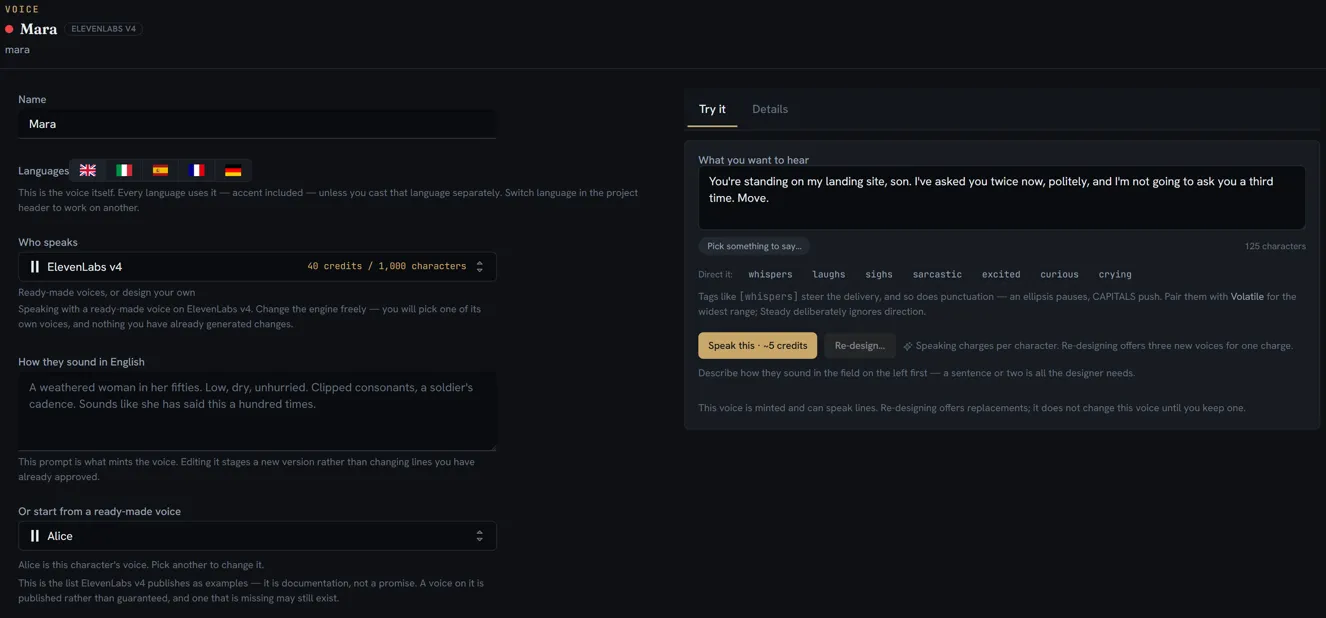
Create the voice
- Open Voices on the rail. The list on the left is the voice library.
- Press + in the drawer’s footer, or right-click in the drawer and choose New Voice. It arrives as New Voice, ready to rename. Folders work as in every other drawer.
- Click the voice to open it as a tab.
The page has two halves. The left is what the voice is — its Name, the languages, the engine, the description. The right has two tabs: Try it, where you hear it, and Details, the engine’s own controls.
Pick who speaks
Who speaks is the engine that will speak this voice. Each row in the picker says what that engine is good at and its rate in credits, and the line under the field repeats it for the one chosen.
Pick it first, because it decides what the rest of the page offers:
- An engine that can design a voice shows a description box — How they sound in «language».
- Every engine that publishes a catalogue shows a list of ready-made voices. On an engine that only offers ready-made voices, that list is the only way in.
You can change engine later. A voice you designed can move only to the engines that speak that same voice; for any other, design it again there and re-cast. A ready-made voice can change engine freely. Either way, takes already made keep the voice that spoke them.
Design it from a description
- Write How they sound — a sentence or two about the person: age, texture, pace, attitude. The placeholder is a fair model: A weathered woman in her fifties. Low, dry, unhurried.
- On the Try it tab, give it something to say in What you want to hear. Pick something to say… offers passages you can search by feeling — grief, an order, sarcasm — in the language you are casting. Or type your own.
- Watch the character count under the box. An engine designs from a passage of two or three sentences, not a single line; until the passage is long enough, the button explains how many characters it still needs.
- Press Audition. You get three auditions for one charge, each with a play button, its length, and the language the engine heard. If that language is not the one you meant, it is marked — paste a passage in the right language and audition again.
- Press Keep this one on the audition you want. It becomes this character’s permanent voice, and its clip is kept as the voice’s reference take. Keeping costs nothing; the auditions you did not keep are not saved.
Audition again gives three new ones from the same description. Editing the description later does not change lines you have already approved — it only changes what the next audition makes.
Or start from a ready-made voice
The list is Or start from a ready-made voice beside a description box, or Pick a ready-made voice where it is the only door.
| Button | What it does | Cost |
|---|---|---|
| Hear it | The ready-made voice says your passage. Nothing is saved. | Charged for the audio |
| Use this voice | It becomes this character’s voice, as it is | Free |
| Start from this voice | Keeps one short clip of it as the starting point, so you can describe how you want it changed and remix it | One short clip, which is kept |
Start from this voice is offered only on engines that can both design and remix.
Hear it say a line, re-design it, remix it
Once a voice can speak, the Try it tab changes:
| Control | What it does |
|---|---|
| Speak this | The voice says the passage. Nothing is saved anywhere — it is for listening. |
| Re-design… | Three new voices from the description, for one charge. Nothing changes until you keep one. |
| Remix it: A nudge · Halfway · A long way | Keeps this voice and moves it toward the description by that much. Three variations, one charge. |
The difference matters: Re-design invents new people from the description alone, while Remix keeps this person and moves them. Remix appears only on an engine that can remix, and only once the voice has a reference take.
Direct the delivery
Under the passage, Direct it: inserts a tag at the cursor — whispers, laughs, sighs, sarcastic, excited, curious, crying. Punctuation directs too: an ellipsis pauses, and CAPITALS push.
These tags are for auditioning. Direction on real lines is set on the Lines page — see producing the lines — and works on every engine.
The tags are offered only on an engine that performs them in place. On any other, the panel says so instead: either that the engine takes its direction differently, or that it does not take direction at all and reads the words as written.
How they perform
Where the engine offers it, How they perform sets the voice’s temperament:
| Setting | What it does |
|---|---|
| Steady | Reads a line the same way every time. Safe, a little flat — and it ignores direction, so tags do less. |
| Natural | Balanced and neutral. The default. |
| Volatile | The expressive one: big range, and it honours direction. Expect more re-rolls, and a better best take. |
The Details tab
Details holds the controls this engine publishes for a voice, in two groups:
| Group | What a change does |
|---|---|
| What she is made from | Re-makes the voice, which produces a genuinely different one. Approved lines keep the audio they have. |
| How she is delivered | Changes future renders only. Nothing already approved is touched. |
A control you have changed carries a reset button that returns it to the engine’s default. Below them, What she was made from and How a line is rendered are a read-only record of the voice. An engine with no controls of its own says so here.
Cast it per language
On a project with more than one language, the page shows a Languages strip. It is a readout, not a control: the highlighted language is the one chosen in the project header, and a dot marks a language cast separately.
By default, the same voice speaks every language — and brings its accent with it. That is right for a character who really has that accent. When a language should sound native instead:
- Switch to that language in the project header. The page reads «Language» uses «voice».
- Press Cast «Language» separately.
- Write how they sound in that language. Write it in English, and name the accent — speaks Italian natively. Translating the description changes its words, and different words make a different person.
- On Try it, use a passage in that language. The passage, not the description, decides the language the voice speaks.
- Audition and keep one, as above.
Until you keep one, lines in that language show voice not minted in Lines and are skipped, rather than spoken in the original voice. The character’s other languages are untouched.
Same as «language» removes the separate cast. Audio already generated with it keeps the voice it was made with.