Appearance and size
Every type-level setting — identity, header band, style, body layout, overflow, shape, marks, colour and size — and which one wins when two claim one axis.
All documentation — The node builder
Boards and the canvas
The node builder
Modelling the world
Variables, logic and commands
Voice and audio
AI
Working together
Project settings
On this page
Node settings is the type’s own form: the row at the top of the Structure tree in the drawer, above the HEADER and BODY folders, and what the inspector shows when a type is first opened. Everything on it is about the type as a whole — what it is called, how a node of it is drawn, how big one is born, and how far it may be dragged. What a node holds is the body page; how each field is drawn is presentation; ports, exits and connection policy are connections.
The inspector is one scrolling column of seven groups, in this order: Identity · In play
mode · Connections · Style · Layout · Appearance — three collapsible rows,
Shape, Marks and Labels & text, each showing its current value while closed — ·
Size & overflow. The header and the body are not among them: each has its own page in the
Structure tree — the HEADER folder and its title row (The header), the
BODY folder (Body layout). Every control autosaves the moment it
commits: text boxes on blur, on Enter, or after a short idle; selects, switches, swatches and the
preview’s drag-resize immediately. There is no Save button and no draft. Ctrl+Z in the
workspace is the way back, one commit per step.
The live preview — the strip of canvas above the inspector, or the column beside it when the tab is wide — is a real node of the type on a real canvas. It is where you see every setting below take effect — and, for size, where you can set one by dragging a corner. Its own line says what a click does — Live preview · click a field, a handle or the band to select it · Drag a corner: resizing writes the type’s width — and the type’s name at its left is a box you can type into to rename it.
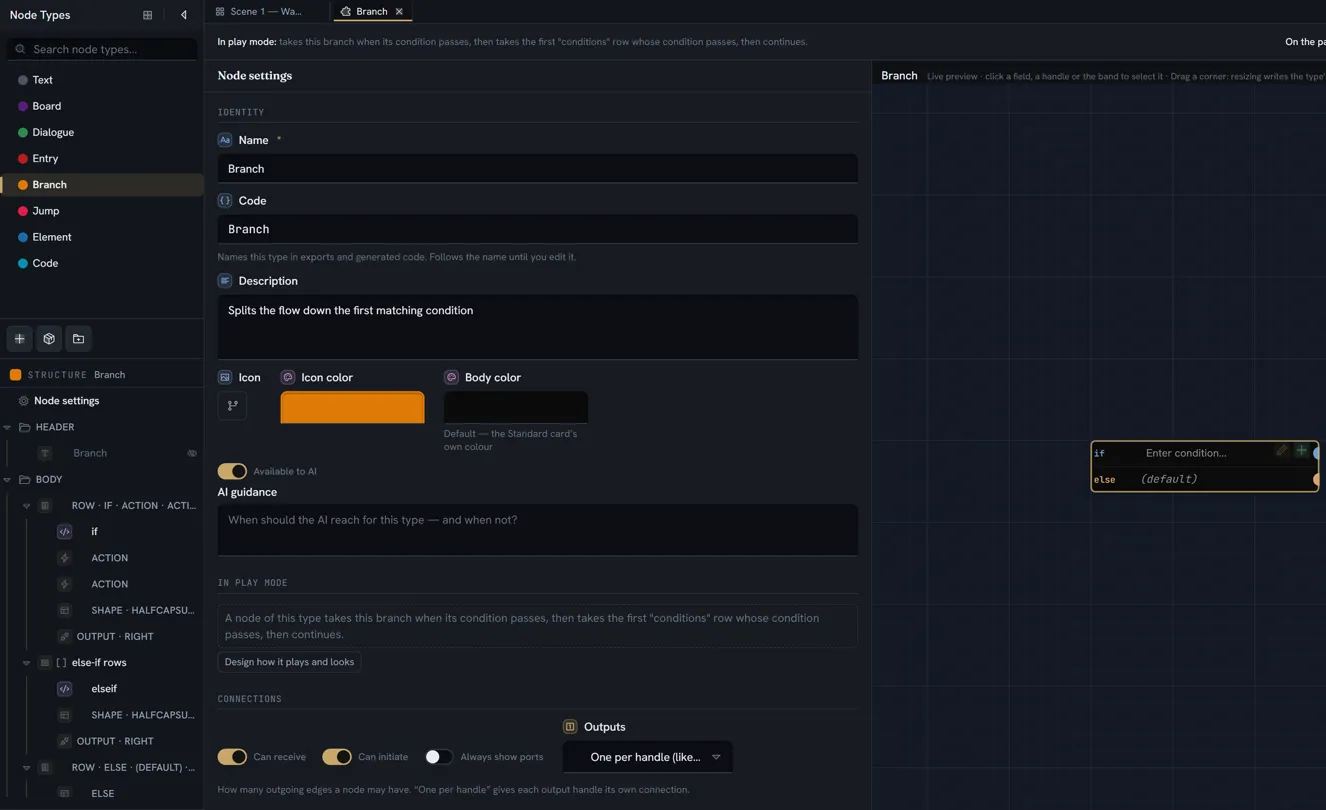
Identity
| Control | What it sets | Default |
|---|---|---|
| Name | The type’s display name: the tree, the palette, the editor tab, and the header title until you give the title its own words | required |
| Code | The identifier exports and generated code use — the rule is below | follows the name |
| Description | What this type is, for a person reading its card in the library or the Start from sheet. It is not AI guidance; that is the separate AI guidance box in the same group | empty |
| Icon | The type’s icon in the palette bar, the radial menu and the library card. Choose icon opens the icon picker: search the catalogues, upload an SVG, or clear it | none — a generic icon |
| Icon color | The type’s accent: the palette strip, the radial menu, the minimap, and the dot beside it in the Node Types tree | the first swatch, a neutral dark — on the radial menu that is a grey circle, so give a type a colour before you look for it there |
| Body color | The card’s fill on the canvas — see Colour | Default — no fill: the style’s own surface, which the swatch shows |
Available to AI and AI guidance sit in the same group and belong to AI. Two switches that read like identity live with the thing they change: showing the type’s name on the card is Show on the card, on the header title’s own page, and Show field labels (with Background patterns) is under Appearance › Labels & text, both below.
The code rule. A code is letters, digits and underscores, starting with a letter or an
underscore. The box accepts anything and repairs it when you commit: spaces and punctuation are
folded into camelCase (Quest step becomes questStep, 3D model becomes _3dModel), an empty
code is rebuilt from the name, and a code another type already uses gets a number (quest2). The
box then shows what actually landed. The code follows the name — rename Quest to
Objective and the code becomes objective — until the first time you edit the code by hand;
after that it is yours, and a rename leaves it alone.
The duplicate banner. A red N export-code problem(s) banner across the top of the type’s tab lists every type or field whose code is missing, invalid, or already in use, and says what would be legal where it can. Because the boxes repair a code as you commit it, the banner appears for a type that arrived with a problem — pasted in, imported, or made before the rule existed — rather than for one you are typing into. It is advisory: it blocks nothing, the type keeps autosaving, and a duplicate reaches the export as it is. What the export does with one is on the node builder reference under What breaks.
In play mode
The second group is a read-out, not a control: one sentence saying what a node of the type will do when played — A node of this type shows “prompt”, then offers one option per “outcomes” row. — and under it either a button to open play mode on a real node of the type or, while none exists, Put one of these on a board, then you can design how it plays and looks. The same sentence heads every type tab. It is documented with the rest of what play mode derives from a type, on connections, as is the Connections group that follows it.
The header band
The header has one home: the HEADER folder of the Structure tree. Click the folder and the inspector is Header — the band’s page, the first table below. The folder’s first row is always the title — the words the header shows, the type’s name unless you give it its own — there even when the header holds no field, never dragged or removed, and dimmed with an eye-off mark while it is hidden on the card; click it and the inspector is Title, the second table. The fields beside the title are the folder’s other rows, added with its +. A press on the preview’s band opens the band’s page.
The header is opt-in. A type has a band — the strip across the top of the card, with its own colour, grid and padding — only when its header carries at least one of three things: a Color, an Icon, or an item in the HEADER folder of the Structure tree (the caption still calls it the Header list on the left). A title on its own does not create one: with Show on the card on and none of the three, the name is drawn as plain bold text above the body, the band’s size controls are hidden, and the caption says so. Min height and Padding size a band; they never create one.
The header’s items are the same eleven kinds as the body’s, and their values live on the node exactly like body fields — see what a node body holds.
The band’s page:
| Control | What it sets | Default | Shown when |
|---|---|---|---|
| Color | The band’s own colour, independent of the body colour. The first swatch means no band colour: the band still exists if it has an icon or items, just unpainted | none | always |
| Icon | An icon drawn in the band. With no title and no items it is centred — the look of the standard Entry node | none | always |
| Columns | The band’s own grid, 1 to 4 columns. The entry matching the body’s count reads N columns (same as body), and while that is chosen the caption reads Follows the body’s columns and widths. | inherits the body | always |
| Column widths | Relative weights, 1 to 6 per column, or Fit — Relative, not pixels — 1 and 3 makes a quarter/three-quarters split. Fit makes a column exactly as wide as what is in it: for a cell with one size, such as a small thumbnail or a dot | equal | only when Columns differs from the body’s and is greater than 1 |
| Min height | The band never renders shorter than this, in pixels — px (blank = fit content) | none — fits its content | only when a band exists |
| Padding | Two boxes, vertical then horizontal, in pixels — px (v × h). The caption under them: First swatch = no band colour. Add the header’s fields in the Header list on the left. Padding 0 puts a thumbnail flush to the band edge. Under a Strip the same two boxes pad the strip — a small vertical padding draws a thinner strip | 8 and 8 (a strip: 8 and 12) | only when a band exists |
The title’s page:
| Control | What it sets | Default | Shown when |
|---|---|---|---|
| Show on the card | Draw the title inside the node — as the band’s title under Standard, as the strip’s kind word under Compact and Manuscript (Style) — Show the title inside the node | off, in every style | always. A style never changes it. Off under a strip, the strip stays only while it has an icon, header fields or a Header colour (that colour is your option to keep an empty tinted strip as the type’s identity; with none of the three, the block goes) |
| Title text | The words the title shows. Blank means the type’s name — the box shows it as its placeholder, and says Blank follows the type’s name. — and it keeps following renames until you type something here | the type’s name | always |
| Title style | The title’s typography: alignment; bold, italic, underline, strikethrough; size, 8 to 48 px; sans or mono; indent, 0 to 40 px; width, 0 to 200 px; colour | the theme’s title style | always |
Three things about the band that are not obvious from the controls:
- Columns are inherited both-or-neither. With no count of its own, the band uses the body’s column count and its weights. Pick a different count for the band and it uses its own weights from then on — equal until you set them. Pick the body’s own number back — the (same as body) entry — and the band follows the body again, its own weights forgotten.
- A band with no floor grows when its content appears. A band holding a speaker picker is short while the picker is empty and jumps the moment a speaker is chosen. Give it a Min height if the type’s nodes should all be the same height from birth.
- Padding stacks with a chip’s own padding. A thumbnail or entity chip in the band carries its own inset; the band’s padding is added to it. Tune by eye in the preview.
Style
Everything above and below this group tunes the card you already know. Style decides how the whole card is painted — and nothing about where its parts go, which is the Layout group below. The group is a set of cards, one per style, each the same small sample node — a speaker beside the name, a spoken line and a choice, laid out as that style’s own packs lay a node out: a style whose packs draw lists adds a two-row table and two exits as lines, while the Standard card has no table and its exits on the edge. Each is drawn whole at about three quarters size, three to a row, in your type’s colour, with the current one framed. Your own type in the chosen style is the live preview beside the form:
| Style | Its caption | What it means |
|---|---|---|
| Standard | A coloured band, values in boxed controls | The card every type had before styles: a coloured band with the title, every value in its boxed control, on the dark card |
| Compact | A tinted kind strip, values as words, on a raised card | A tinted strip with the type’s name as a small kind word and the header fields beside it; a value at rest as a bare word, a pill or an unboxed chip; the lighter raised card |
| Manuscript | A page of a printed book — serif type, hairlines, a heading in your colour | The card as a page: the kind as a small heading over a hairline in your colour, the name set large in the serif, labels in small capitals, a picture framed as a plate, tables with book rules, a condition set as a formula, exit rows as contents lines — a dotted leader running to the port, only if before a gated exit’s condition |
| Rig | A trading card — a dark cut-corner chassis, the kind up a spine in your colour, condensed capitals | The card as a trading card: a dark chassis with two cut corners, the kind running up a spine in your colour with the type’s icon in a corner hexagon, the name in condensed capitals |
A click on a card is the edit — the preview redraws, every node of the type on every board redraws,
and Ctrl+Z is the way back. There is no count of affected nodes and no confirmation, exactly as
for any other setting here. A style writes nothing but itself: your Layout, every field’s own
Shown as and whether the type’s name shows are exactly as you left them in every style, so you can
flip through them all and lose nothing. Nodes of different styles sit on one board side by side,
wired as before — a style never moves a port. A style never leaves the editor either: the game
export, both engine plugins and play mode do not read it.
Under a style whose header is a strip that it tints (Compact), one more row appears — Strip
Tinted, on by default. Off, the strip is a caption line on the card itself: no colour block, no
bar on its edge and no rule under it; the kind word keeps the type’s colour and the header fields
sit beside it (the Beat card’s BEAT · Toll bridge).
Manuscript prints its own page. It follows the app’s theme — ink-dark in the dark theme, paper in the light one — and your colour stays the heading’s colour in both, lifted just enough to read on each page. Body color and Prose face step aside under it, each replaced by a line saying why, and the strip’s Tinted switch is not offered; your choices are kept and come back with another style.
Two more ways to pick a style, for many types at once:
- The Library’s Style picker, beside its search — As designed (each type the way its pack draws it), then each style. Every card in the Library redraws in the one you pick, and every type you add from it arrives in it — Add, Add all and Add a copy alike. A type your project already has keeps its own style: Add all skips it as always. A type can belong to several packs and your project holds it once, so it keeps the style it first arrived in.
- Draw in … in the Node types list — select one or more types, right-click, and pick Draw in
Standard, Draw in Compact, Draw in Manuscript or Draw in Rig (Draw 4 types in Manuscript
for four).
One click, one
Ctrl+Z. Folders are skipped, and an entry is left out when every type you picked is already drawn that way.
Refreshing a pack type (Update) keeps the style you gave it, as it keeps where you filed it.
Layout
Layout decides where the parts of the card go and what shape they take — the same in every style. Two pickers: Fields Grid / List · Exits On the edge / As a list / As tabs / As stamps / As chips / As ends / As cards / As a truth table / As odds / As a quiz. As a list draws a footer row per exit — the exit’s kind in the mono face, the wire’s condition, and the dot that IS the port right beside the word; the exit’s own label is the row’s tooltip, so two exits of one kind are still told apart. As tabs runs the exits across the card’s bottom, sharing its width, the dot at each tab’s start; As stamps draws them as bordered words in their kind’s colour at the bottom right; As chips draws reply chips wrapping under the body. The replies are a repeater on the node: under As chips, a repeater whose rows carry a port draws one chip per row — the row’s first text field is the chip’s words, edited in place like any field; the wire’s condition is drawn on the chip as a code pill (a long one clipped, whole on hover), and a chip whose wire carries a condition is drawn dashed, a reply not yet open — right-click the chip to set that condition (it is the wire’s, so the wire’s own menu sets it too); the row’s add and remove are how a reply is added or taken away, and the dot at the chip’s start is its port. A type-level exit handle under As chips is a chip too, saying what its wire is labelled. As ends draws the exits in one line under a hairline at the card’s foot — each its dot, its kind in small caps and its label, the wire’s condition as a code pill — the ways a sequence ends. Under all four the wire leaves downward from the dot, through the card’s bottom edge — the tabs are that edge — where a list’s wire leaves to the left. The last four ways — As cards, As a truth table, As odds and As a quiz — each get their own paragraph below. Exits is PICTURES: a tile per way, each a premade library type that draws it (or, for the few none draws yet, a small sample of our own), the current one framed; under a way this type cannot draw yet, the one thing it needs — Needs a list whose rows have their own port — or The list here sets its own Block style when the list that would carry the exits has picked its own drawing, which wins. Fields stays words; hover an option for one line on what it draws.
Each list draws itself. How a list’s rows are drawn is not a node setting: it is the list’s own Block style — Card / Flush / Table / Bubbles / Track / Checklist / Screenplay / Slides / Sentence — offered as the same kind of pictures when you select the list in the tree, and only there, so a node with no list never asks. One list a table, another bubbles, a third a track, on one node. A list with no pick draws as cards; a way with a requirement (a track’s Start, a checklist’s yes/no, a slide’s picture, a sentence’s template) says what the rows still need under its picture. Under an exits way that draws rows — As chips, As cards, As a truth table, As odds, As a quiz — a list whose rows carry a port and has no pick of its own draws as those exits, and its settings say so; picking a drawing draws it as a list instead, and Draw its rows as the exits hands it back. A type made before 26 September 2026, when a single node-level Repeater picker drew every list on the node, opens with that way moved onto each list it drew.
Bubbles draws a repeater as a conversation. Each row is a speech bubble; nothing is declared
about which field is which — the way reads the block’s fields by type and order, and the number
is the divider: everything before the block’s first number field is in the bubble — its first
entity field is the speaker, drawn as a small round face beside the bubble with the name as the
bubble’s first line, its text fields are the words, stacked, anything else a plain cell under
them; that number is the pause after the line, in seconds, drawn as the beat between this bubble
and the next (· 0.6 s ·); and everything declared after the number sits on the beat, whatever
its type — a text is the beat’s note (· 1.4 s · the pods hiss open ·), a select or a reference a
cell on the same line. So what sits between two exchanges is decided by ordering the block’s fields
in the builder, which says the rule under Each block while a repeater draws as bubbles. A line
with no speaker is a bubble with no face. An empty beat is the thin gap between two bubbles — rest
the pointer on the node and a short tick marks it; double-click it to set a pause. Below the pickers, one
more row appears while a repeater draws as bubbles — Side: All left · All right ·
Alternating, where the side flips each time the speaker changes so one actor’s consecutive lines
stay together · Player right, where the player’s lines sit on the right and everyone else’s on the
left. Who the player is is the project’s answer, not the type’s: open the character in
Entities and turn on Player in its header (one per project; turning it on for another
character moves it). With no player designated the row says so and every bubble sits on the left.
In play mode the lines are presented one after another, each after the previous one’s pause, and
the replies appear after the last.
Track draws a repeater as a lane on the card’s time ruler. Every repeater whose block marks
a Start field is a lane: one bar per row, from its start for its Duration, in the type’s
colour — or, when the block marks no duration, a small diamond mark at its time with the label
beside it. Unlike Bubbles, the two are declared: under Each block two rows appear while a
repeater is asked to draw as a track — Start and Duration, each one of the block’s number
fields (a bar’s time is too consequential to guess from field order). A repeater with no start
marked draws as the plain block list until one is picked, and says so. The bar prints one thing:
the block’s first text — or, when the block leads with a character (an entity) and a text
follows it, that text alone, what they say; the character is in the row’s card, not on the bar
(it took the bar’s width). A bar is a label on a span of time: nothing on
it is edited in place — the row’s card (a double-click anywhere on the bar, or the pencil that
shows while the node is selected) holds every field of the row, the label and the words included,
and the row’s remove. The repeater’s label is the lane’s name, in the
narrow column at the left; the ruler is drawn once, above the first lane, to the type’s
Length — a node-level number field picked in one more row under the pickers while a repeater
asks for a track. Its ticks always fall on round numbers (a length of 25 ticks 0 · 5 · 10 … 25),
and each lane draws a grid line under every tick. While a type’s length is left empty on a node,
the ruler ends at 60 and stays there as bars move, until a bar reaches the last tenth of it; a
type with no length field has a ruler that runs a little past the furthest bar, so the last bar
can still be stretched. On the node a bar is dragged to move its start, and its right end to
change its duration — each drag one edit, undone with Ctrl+Z. With no length typed, a drag that
nears the ruler’s end grows the ruler to its next round length as it goes, and the release keeps
it; a typed length is the limit, and a drag stops at it. A row added after a bar starts where that
bar ends, for as long as it, and a row added after a mark starts one tick after it. Hovering a
bar, a mark or a bead shows its time. A mark whose label is a record shows the record’s picture
only — its name is in the hover — since a mark has no length to hold words. What a lane holds is
yours:
nothing here knows enemies from audio, and a type may carry as many lanes as it has repeaters.
In play mode the plugins read each row’s start and duration by code and schedule from them; the
type’s length is what the sequence waits for.
Four more knobs ride the track, each off until picked. A row can recur: two more rows under Each block beside Start and Duration — Every, the number field that is the interval after the row’s start, and Repeats, how many times in all (the start counting as one; offered only beside Every) — draw a bead on the lane at each recurrence, the bar or mark itself once at the start. A repeats with no every draws once, and the builder says so; a recurrence that falls past the ruler’s end is not drawn. In play mode a repeated row is one beat at its start — the plugins receive both fields by code, and a handler that loops it decides its own cap. A lane can be bands: the repeater’s Lane — Bars (the default) or Bands — draws its rows as full-height spans behind the other lanes, the row’s label at the span’s top-left; a band needs a duration, and a row with only a start draws as a vertical rule. The band lane keeps its own row of controls, so nothing about editing changes. A bar can take its row’s colour: Bar colour — Lane (the type’s colour, the default) or Row — paints each bar or mark from the row’s first character’s colour, its face on the bar. The ruler can run down the card: Ruler — Across (the default) or Down — in the Layout group beside Length, turns the lanes into columns, time running downward, the ticks down the left; a bar is dragged up and down instead. Nothing stored on a node changes under any of the four.
Two more knobs make the track a schedule. The ruler can count as a clock: beside the
orientation, the same Ruler row picks how it counts — Numbers (the default), Wraps round,
Hours or Clock. Under Clock the ticks read as hours, 00 · 06 · 12 · 18 · 24, the ruler is a day
long while no length is set (a typed length still wins) and it never grows to fit a bar; a stretch
that runs past the end wraps: 22 for 4 draws as its bar from 22 to the end and a tail from
00 to 02, and its hover reads 22 – 02. A bar dragged there carries on round the ruler instead
of stopping at the end. Wraps round wraps the same way with plain numbers — a week, a patrol
loop — but with no Length typed its ruler grows to fit like Numbers: it ends a little past
the furthest bar. Type a Length to fix where it ends. Hours is a clock that does not wrap —
the same hour ticks and the same day-long ruler, but a stretch stops at the end, as under
Numbers (a shift, a countdown).
A variable can take the row: Taken by, the row under Ruler, picks one of the type’s
node-level variable links (single, not a list, and not one that accepts a typed name — words are
never a clock) — the value the game advances: an hour, a turn, a
chapter, an alert level. In play mode the runtime takes the one row whose span holds the
variable’s value (read round the ruler under Clock and Wraps round — and round the ruler as
the card draws it, so under Wraps round with no Length a value in the gap past the last bar
takes no row rather than wrapping onto the first), and a row with a condition and no start is
tried first, whatever the value; a ported row is the one exit taken, never a menu. Only a lane
drawn as a track is taken: Taken by is about the ruler, so leaving Track — the list’s own
Block style set to something else, or a lane whose rows are exits drawn as chips — turns the take
off for that lane, and it plays every
row as it would with no variable. On the card such a row — a row with no start on a type taken by a variable — is not
a stretch at 0: it sits on a dashed line of its own above the ruler that reads as a sentence
— while lockdown — the corridor checkpoint, whatever the hour (whatever the value on a plain
ruler): its condition, its label, nothing clipped; its words are in its card. Its port sits at the
line’s end like a bar’s, and its row controls lie over that end only while the node is selected;
typing a start in its card moves it onto the lane. A row with no start and no condition is never
taken — it says nothing about when — so its line is dimmed and ends never taken — give it a
start or a condition; typing either clears the mark. On a type no variable takes, a row with no start
draws at 0 as it always has. Nothing — a picture stores nothing.
A lane whose rows are exits keeps each dot off the words. When a lane’s block carries an exit handle, each row’s dot sits on its bar’s end — so every bar keeps the dot’s half-width clear at both ends, and a bar that starts where another ends never has its first letters under that dot.
Sentence draws a repeater as prose with inline slots. Each row is one line of the block’s
Template — typed under Each block, with the block’s codes offered as chips: {verb} the
{ingredient} for {minutes} min. — where every {code} is that field’s cell, edited in place
between the words (a text or a number as a bare word, a select as its option, a reference as a
chip; an empty slot draws its hollow with the label). A slot naming no field of the block prints
as the text it is, and the builder says which; a field the template does not name is the row’s
card’s, opened by the pencil that shows while the node is selected. The rows read as a
paragraph — a recipe’s steps, a rule’s clauses, a spell’s lines — and Tab steps between one
row’s slots and on to the next row’s. A text slot holding a long value — a spoken line — wraps
within the row rather than ending in …. A row that is an exit prints it at the line’s end:
when the block carries an exit handle, each line ends in the exit’s word and its dot — the handle’s
label, or the row’s pick of the block’s Exit word select (the Barrier’s key, skill). A repeater asked to draw as a sentence with no template
draws as the plain block list until one is typed, and says so. The rows can run on: one more
row in the Layout group, while a repeater draws as sentences — Rows: A line each
(the default), One paragraph, where each row’s sentence follows the last on the same line and
the rows wrap as one paragraph of prose, each row’s quiet controls at its end, or Exit word
first, where each line opens with its Exit word in a column of its own down the rows (as
wide as the longest option, so picking a longer word moves nothing), edited where it is printed,
and the exit at the line’s end keeps only its dot — the Barrier’s key · someone · skill · force
down the left. A block with no Exit word draws a line each. A line break in the template starts
a second line: whatever follows it is drawn on the row’s own second line, quieter and smaller —
a condition over its note. In One paragraph the break reads as a space. Nothing stored on a
node changes; the rows, their order and their slots are the same.
Blocks can flow as tiles. The repeater’s Direction — Stacked · Row · Tiles — has a third value: under Tiles the blocks wrap as fixed-width tiles, each block’s fields stacked, the remove a corner badge on the tile and the add a hollow tile at the grid’s end, always — the block’s row order is add-at-the-end. A roster of faces with counts, a hand of cards. A field whose label is shown reads on one line in a tile — its label, then its value — so a number in a tile can say what it counts; a reference keeps its label above it, so the record’s name (or the empty picker’s placeholder) has the tile’s width, and a picked record’s name shortens to fit the tile. A tile has a corner: the block’s Corner (under Each block, while the blocks flow as tiles) names one of its number, text or single-select fields, drawn as a small badge on the tile’s top-left corner — a puzzle piece’s step, a dial’s symbol — and edited there in place; empty, it is a dashed badge with a dash. When the corner is a number, one line under the tiles spells the order out, the rows sorted by it: reads Wolf → Crown → Ring · Moon never, a row with no number being the decoy.
Rows can be grouped. Group by on the repeater — one of the block’s single-select or single-entity fields — seats the rows under a heading per distinct value, in the order the values are first seen: under a card list and under a table a heading row (its word, or the record’s name and colour), and on a picture (Map) a row of tabs over the legend — All first, then one per value — that filter which marks and legend lines are shown, the tab in the record’s colour. A row with no value sits under Other, last. The grouping is a drawing: the rows keep their own order and nothing stored changes.
A block field can sit between rows. A field’s Between rows switch (a block field only) draws it as a seam before its row rather than inside it — a phase’s trigger before the phase, a chapter’s heading before its lines — full width, across a card list, a table (a full-width row) and a band lane (on the span’s leading edge). The first row’s seam draws only once it has a value; the field stays in the row’s card. One seam per block: a second flagged field draws inside the row, and the builder says so.
A picture’s marks have three knobs of their own, on a repeater whose rows are drawn on the picture: Legend shows picks block fields whose values sit on a line under the name in the legend — a number with its label (a number with a Unit reads After 2 s), a character as a chip, a word — in the order picked, each place then on its own row; Mark — Pin · Square · Diamond · Link — is the mark’s shape, a row with a character keeping its face whatever the shape, and Link needing two place fields in the block (the first is where the arrow starts, the second where it points, an area pointed at its centre) to draw an arrow between them with the block’s first text at its midpoint, both ends still dragged as marks; Path joins the rows’ pins in row order with a dotted line, so the row order is the route.
Checklist draws a repeater as lines of ticks — the node’s own. Every repeater whose block
carries a yes/no field is a list: one line per row, the box at its start, ticked in the
type’s colour, and the line’s words beside it, struck when the box is ticked; k / n after the
section’s word. The roles are read by type and order, like a bubble’s, and the builder says the
rule under Each block: the first yes/no field is the box, flipped in place with one click;
the first text is the words, typed in place on a double-click; the first reference is the
face before them — a row that references a record (an objective, a crew member) shows that
record’s thumb and name, and when the row has no text of its own the name is its words. Every
other field of the row is edited in the row’s card — the pencil that shows while the node is
selected, or a double-click on the line’s chrome; a row with nothing beyond its box and words has
no card, and the double-click edits the words. The list’s + Add line follows the last tick. A
repeater with no yes/no in its block has nothing to tick and draws as the plain block list until
one is added, and says so. The ticks are the node’s data — at this point in the story, these
are done — which is what tells this way from the Checklist reading on a reference field
(Shown as), where the ticks are the referenced records’ own and the
card only reads them: a journal’s quest record lists its objectives read-only through its view,
and the node’s progress list under it is the one you tick.
As cards draws the exits as picture cards — As chips’ sibling. It reads the same repeater a chip strip does: a repeater whose rows carry a port draws one card per row, side by side under the body. Nothing is declared about which field is which; the way reads the block’s fields by type and order, and the builder says the rule under Each block while the exits draw as cards: the first picture or character is the card’s face — a picture field, or an entity field, whose own picture is the face — the first text its title, the next text the line under it; the wire’s condition is the gate, drawn as a code pill on the picture, and a card whose gate is set lies face-down, a choice not yet open; every other field of the row is a plain cell under the line. The card’s drawing is fixed — the face on top, the title, one line, the dot on the card’s bottom edge — and the wire leaves downward from that dot, like a chip’s. The row’s add and remove are how a card is added or taken away; a type-level exit handle under As cards draws as a footer chip, as under As chips. So the card is not a type: a crew pick, an evidence fan, a shop and a dilemma are the same way over four blocks — three fields or ten, the way takes the first picture and the first two texts and leaves the rest to the row’s card. In play mode the rows are the player’s choices, exactly as under As chips; the picture reaches the Stage, Unity and Unreal as the choice’s data, for each to draw as its own UI likes.
As a truth table draws the exits’ conditions as a decision table — a reading, never a
store. It reads whatever gates the node’s exits already have, wherever each lives — a wire’s
condition, or a Branch or Gate row’s own — and draws one column per distinct term (a comparison,
a name, a call — anything joined by && or ||, first seen first), one row per exit with a ✓
where the row needs that term true, a ✕ where false and a – where it does not look at it; the exit’s
words sit at the row’s right, the dot on a seat beside them, and the wire leaves to the right,
the way a table reads. The rule that makes it usable with more than one &&: a row is an AND;
several rows to one exit are an OR. A gate written hasKey && !alarm || override is two tinted rows
to the same exit — ✓ ✕ – and – – ✓ under hasKey · alarm · override (a negated term’s column is
its positive form). A gate that is not already that flat shape — a ! over a group, an || inside
an && — is printed as written in one cell spanning the columns, with a pencil that opens the
condition editor, so nothing is ever rewritten into a shape you did not type. The exit with no gate is
the otherwise row, – in every column and listed last. A click on a cell edits the gate: it
cycles the cell – → ✓ → ✕ → – and writes that one exit’s gate back in the flat shape, each row’s
terms joined by &&, the rows by ||, in the table’s column order; a row that ends up empty makes the
exit ungated when it was the only row, and is dropped when others remain — an OR with an always-true
arm would silently open the exit. A click on the otherwise row gives it its first term; a
printed-as-written gate takes no click, only its pencil. A repeater whose rows carry a port is
listed in the same table — a Branch’s own if rows: each row’s first text is its words in the exit
column, its condition field (the one a chip would read as its gate) is what the cells read and
flip, and the rows draw no blocks in the body, since the table is their home; a double-click on a
row’s words opens the row’s card, where its other fields live, and the + under the table adds a
row. The type’s own handles read their wire’s condition in the same table, so a card with both has
one table, not two. Beyond that nothing is configured: the columns come from the gates, and the
ungated exit is the else. In play mode nothing changes — the runtime evaluates the same gates it
evaluates under any other way, and the table is only how they are read on the card.
As odds draws a random branch’s weights as bars. It reads a repeater whose rows carry a
port and whose block marks a number as its Weight — a row under Each block, offered while
the exits draw as odds; with none picked, a number whose code is weight is read — and the
builder says the rule there: the Weight field is the outcome’s weight — its bar is that weight over
the sum of every row’s weight, its share printed after the bar, and a weight of 0 reads never —
the first text its label, the wire’s condition its gate, printed under the label as a code
pill, the first colour its own paint — it colours the row’s bar or slice, and a blank one takes
the wheel’s own colour for that row; every other field is a plain cell after the share. The flow
pack’s Random branch (weight · label · only if) is exactly that block, so it draws this way with
nothing declared. The share is over all weights, whatever the gates say — which of them pass is
unknowable until play. A repeater whose block has no weight number shown on the card — none
marked, and none coded weight — has nothing to weigh, draws its rows as chips until one is
added, and the builder says so — a weight hidden on the card draws no bars, but the draw at play
still uses it. The dot sits at the row’s right end
and the wire leaves to the right. The way’s one knob, Odds in the Layout group —
Bars (the default) or Ring: as a ring, the outcomes are the slices of a ring
in their order, each slice’s share its arc, the dot on the ring’s edge at the middle of its
slice, the outcome’s words beside the dot running away from the ring, and the sum of the weights in
the ring’s hole; a never outcome keeps its place around the ring with no slice. The rows are the
same rows, the gate and the share the same reads. At play the draw is by those weights — in
play mode, in Unity and in Unreal alike: among the outcomes whose conditions pass, one is drawn by
weight from the playthrough’s seeded generator, so a save restored and re-advanced draws the same
outcome, and all three runtimes draw the same one from the same seed. A weight of 0 never fires;
a blank, a word or a negative counts as 1, a plain ticket; when every passing outcome weighs 0, no
exit is taken and the path ends there. A node whose passing rows carry no weight number takes
the first of them, as any ported row does.
As a quiz draws the exits as a question’s answers. It reads a repeater whose rows carry a port and whose block carries a text, a yes/no and a second text, and the builder says the rule under Each block: the first text is the answer, the first yes/no says whether it is correct — the ring at the row’s start is ticked when it is — the second text is the feedback shown under the answer in italics; the wire’s condition is its gate; every other field is a plain cell after the feedback. A repeater with no yes/no in its block has nothing to grade, and one with no text shown on the card has nothing to offer as an answer — either draws its rows as chips until the field is added, and the builder says so. An answer row has no dot of its own. The question leaves by the type’s first two exits at its foot: the first is correct, the second wrong — a type with one such exit has no wrong exit, and a wrong pick then ends the path as a node with no passing exit does. Two node-level fields complete it, both optional: the first number is the question’s worth (blank counts as 1) and the first variable is its score. At play — in play mode, in Unity and in Unreal alike — the answers are offered as the step’s choices; a picked answer’s feedback, when it has any, is presented as a step of its own before anything moves (an answer with no feedback leaves at once); then the exit its yes/no names is taken, and on the correct path the score variable is raised by the worth. A question with no score variable counts nothing.
Screenplay draws a conversation as a page of script. The rows are the same rows Bubbles
draws — the same block, its fields read by type and order, the number still the divider — set as
a screenplay page instead of a thread: the speaker (the block’s first entity field) is a centred
cue, the text is the dialogue block under it, the first number is a (beat · 0.6 s) line
after the block, a text declared after the number is a parenthetical under the cue, and a row
with no speaker is an action line. Nothing new is declared or stored — a conversation switched
between Bubbles and Screenplay keeps every value, its pauses included — and the builder says the
same rule in the page’s words under Each block: Everything before the first number is the
speech (the first character is the cue, text is the block under it — with no character it is an
action line); that number is the pause after it, a beat line; text after the number is a
parenthetical under the cue. A page has no side, so the Side row is not offered. In play mode
the page is paced exactly as the bubbles are — each line after the previous one’s pause, the
replies after the last — and the plugins read the same pause field either way.
Slides draws a repeater as a deck. Every repeater whose block carries a picture — an asset field, shown on the card — is a deck: one 16:9 slide per row, its picture in the frame, the block’s first text as the caption under it, and the row’s condition — the block’s first condition field, the same one a reply chip wears — as a ribbon on the picture’s corner when it is shown on the card (a condition hidden from the card still gates the row and simply wears no ribbon). The roles are read by type and order, like a bubble’s, and the builder says the rule under Each block: The first picture field is the slide; the first text is its caption; its condition is the ribbon on the corner. Every other field is edited in the row’s card. Every slide draws the same on the board, whether or not its condition holds — the board never plays a condition. A repeater with no picture field in its block has no slide and draws as the plain block list until one is added, and says so.
Three things follow from a region’s choice that the rest of this page should be read with:
- A region’s way can make a control meaningless, and then the control is gone — with its reason in its place. Under a strip header (Compact, Manuscript), the header’s Min height and the Edge rail are replaced by A strip draws its own bar on the header and is as tall as its line. (Show on the card stays — see the title’s table; Padding stays too, and a strip reads it over its own 8 × 12 — a small vertical padding is a thinner strip.) Under List, the Columns group reads A list is one field per line — there are no columns to count or weigh. A list’s own Block style does the same for that list alone: under Table its direction, columns and Row dividers read A table frames and divides its own rows; its columns are the block’s fields., under Bubbles the same three read A conversation lays its own bubbles out — the speaker beside each, the beat between them., under Track A track lays its own lanes out on the ruler — each row a bar at its start, for its duration., under Checklist A checklist is one line per row — the box, the words, a face — and lays itself out., under Screenplay A page of script sets its own lines — the cue centred, the block under it, the beat between., under Slides A deck lays its own slides out — a picture per row, its caption under it, wrapping to the card., under Sentence A sentence sets its own line — the template’s words with each slot inline; there is no grid to lay out. Under As a list (and As tabs, As stamps, As chips, As ends, As cards, As a truth table, As odds, As a quiz), each exit handle’s Side, Placement and Size read An exit row owns its port — the row is where the wire leaves, on its left. — or the way’s own version of it, naming where its dot sits. Nothing is greyed out; the reason stands where the control stood, and switching the region back brings the control back with its old value.
- Under every exits way but On the edge the input anchors to the header. The whole-left-side capsule a node normally shows gives way to a short capsule beside the title, because the rows below it own the exits. An input you placed yourself — on a field, or at a fixed offset — is left alone.
- Colour still comes from the author. A strip is the header colour mixed lightly into the card; an exit row’s dot is coloured by its kind — grey for continue, amber for branch, the offer and display accents for those — unless the handle carries its own colour, which wins. The theme decides the fonts and the board; a style never does.
The style a type declares nothing about is Standard, and a type that has never opened this group is drawn byte-for-byte as it was before the group existed.
How a value reads at rest is each field’s Shown as default, decided in two places. In a Grid, a List or inside a repeater’s Blocks, the style decides: under Standard every value is its boxed control; under Compact and Manuscript a text or a number is a bare word, a picked option, a condition and a piece of code are mono pills, a reference is an unboxed chip, a colour its swatch. Every other drawing reads the same way in every style: under Table as a Compact list does; under Bubbles the speaker is an avatar and the words are prose, the rest as a list; under Track a bar’s label reads as a list (a word, or an unboxed chip for a character); under Checklist the line’s yes/no is a tick box; under Screenplay the words are prose and the speaker an unboxed chip whose name is the cue; under Slides the picture is a portrait and the caption prose (the condition’s mono pill is what the corner ribbon is made of); under Sentence a slot reads as a list does and a yes/no is a tick. A field may say otherwise in its own inspector (a meter, a portrait, a stat — see Shown as), and that choice survives every style; where a style’s header cannot draw it (a meter in a strip), the cell draws its default there, warned, and the choice comes back with a style that can.
Exit facts
Whatever way the exits draw, a type can print one or more facts under each exit — a short strip beneath the row, the chip, the card or the table cell, read across the wire from what it reaches. Four switches on the Exit facts row of the type’s Layout group (not in the Exits group, which holds the handles), each off until you turn it on, and one strip that every exits way but On the edge draws the same way:
| Switch | What it prints under an exit | Where it is read from |
|---|---|---|
| Where it leads — Show where each exit leads | The first line of the node the wire reaches — its preview text, the same line the jump picker and search show for that node (the type’s word, Branch, when it has no text) — greyed, with that node’s speaker’s face when it has one. An exit with no wire reads not wired yet | derived: the node at the wire’s far end |
| Why locked — Show why an exit is locked | The sentence the wire’s author wrote for the reader, under a gated exit — needs the workshop key, only once the alarm is off — beside the condition, on the wire itself. A gated wire with no sentence prints nothing | authored: the reason on a wire |
| What it changes — Show what each exit changes | What the node the wire reaches does to the story’s numbers, as stamps — +1 medkits, −1 trust, = 0 alarm — read from that node’s script when it is a Code node; no change when it is not | derived: the Code node at the wire’s far end |
| What it requires — Show what each exit requires | The requirement rows of the node the wire reaches, one line each: a lock for a row whose Unmet is Shown, locked, hidden unless for one whose Unmet is Hidden — then the row’s Reason when it has one, else its condition. A target with no requirement rows prints nothing | derived: the requirement rows of the node at the wire’s far end |
Nothing is stored on the node for the three derived facts, and nothing has to be kept in step: the strip is read live — edit the first line of the node a wire reaches, rewire the exit, change the Code node’s script or the target’s requirement rows, and every card pointing at it redraws. Only Why locked is something you write, and you write it once, on the wire, where its condition is. All four print in the same place under every way — a chip’s strip under the chip, a card’s under its line, a table row’s under the exit cell, a block row’s under its fields — so turning one on never changes which way the exits draw, and turning all four off leaves the card byte-for-byte as it was. A type that declares none of the four prints nothing.
The four are one system on purpose. Where it leads answers what happens if I take this;
Why locked answers why can’t I, yet; What it changes answers what does it cost or give;
What it requires answers what does the place I reach ask of me — four questions a reader of
the board asks of the same row, so they share one strip rather than four affordances. Play mode
draws none of the four strips: the Stage’s locked-choice chip has its
own reason (the four behaviours) — and the Why locked
sentence is what that chip says for the wire. It rides the engine payload as the edge’s reason,
so when that wire’s condition blocks a choice, the Stage, Unity and Unreal show it as the block’s
reason, exactly like a requirement row’s sentence.
Body layout
Click the BODY folder in the Structure tree and the inspector is Body, the body’s own page — as the HEADER folder is the band’s. Three groups draw the body there: Grid (the column model), Body & rows (the flow and the spacing) and Separation (how rows are told apart). The folder is still where the body’s fields are added, with its +.
| Control | Row | What it sets | Default | Enforced |
|---|---|---|---|---|
| Body columns | Grid | How many columns the body’s fields flow into | 1 — on a type made from blank and on seven of the eight standard-pack types (Board declares none and reads as 2); a pasted type that declares no count reads as 2 | 1 to 4 |
| Column widths | Grid | The relative weight of each column, or Fit for a column exactly as wide as what is in it (a small thumbnail, a dot). Shown only when Body columns is greater than 1 | equal | Fit, or 1 to 6 per column |
| Row flow | Body & rows | Vertical stacks the body’s units; Horizontal puts them side by side on one line | Vertical | |
| Body min height | Body & rows | A floor on the body region’s rendered height, in pixels | none — the body fits its content | nothing |
| Card padding | Body & rows | The inset between the card’s edge and its content | 8 | nothing |
| Row spacing | Body & rows | The gap between rows | 10 | clamps at 40 |
| Row height | Body & rows | A minimum height for every row, so rows read as one uniform list | rows fit their content | clamps at 200 |
| Row inset | Body & rows | Padding inside each row | 0 | clamps at 40 |
| Control outlines | Separation | Theme default lets each control draw its own outline as the theme sees fit; Hidden removes them | Theme default | |
| Row dividers | Separation | Line between rows — a hairline above every row after the first, the list or ledger look. In a horizontal flow it becomes a vertical rule | off |
Where a box says blank = fit or blank = 8, clearing it restores that default. Card padding, Row spacing, Row height and Row inset accept 0 as a value; Body min height treats 0 as blank.
A fourth row, Labels & text, holds two switches and a select, and summarises the first as Labels or Placeholders:
| Control | What it sets | Default |
|---|---|---|
| Show field labels | Whether fields show their label by default — Off = use placeholders instead of labels. A field’s own Show label overrides this either way, and heading, trait and header titles are unaffected | off on a type made from blank |
| Step arrows on numbers | Whether a number field shows the browser’s ▴▾ arrows beside the digits while it is being edited — Off = the digits edit in place like a word. The arrows sit inside the editor’s own box, so the switch never moves a row either way | on |
| Background patterns | Offer the sticky-note / paper patterns in this node’s right-click menu (they replace its colour) — see Background patterns | off |
| Born as | Shown while Background patterns is on: the pattern a node of this type wears until it picks its own — Plain card, or any of the patterns below. A node’s own pick from its right-click menu overrides it | Plain card |
Weights, never pixels. A column’s width is a share of the card, not a pixel count. A fixed-pixel column cannot shrink, so on a narrow node it would starve its neighbour; a weight always divides whatever width the node has. The same model is used by a repeater block’s grid and by the header band. A field takes one column unless its own layout spans more — that is a per-field setting, on presentation.
Row flow flips what “grows with content” means. With a vertical flow, a type that grows with content grows downwards: the body is as tall as its rows added up, and the width is whatever the type says. Turn the flow horizontal and the meaning flips: the body is as tall as its tallest unit, and it is the width that wants to grow. The row knobs re-aim rather than break — Row spacing becomes the gap between side-by-side units, Row dividers become vertical rules — but a horizontal type usually wants Fits content as its width mode, or its units share whatever width was typed. Row flow arranges the body’s units; a repeater’s own direction arranges its blocks. They are two settings, not one.
Two insets, not one. Card padding is the space between the card’s edge and everything inside it; Row inset is the space inside each row. Substituting one for the other is what makes a dense node look wrong at both ends: the compact built-in look is a small card padding with no row inset, not the same number in both.
Two floors, not one. Body min height is a render floor: a node that grows with content is never drawn shorter than it. The Min height under Size & overflow is something else — how far a drag may shrink the node. Neither substitutes for the other; see Size.
Overflow
The second half of Size & overflow.
| Control | What it sets | Default | Only applies when |
|---|---|---|---|
| When too short | Scroll the body or Clip (cut off) | Scroll the body | a node’s height is pinned below its content |
| Scrollbar | Reveal on hover or Always visible | Reveal on hover | the body scrolls — under Clip (cut off) the control is replaced by Clipping draws no scrollbar — choose Scroll the body to reveal its settings. |
| the dwell delay | ms rest before it shows — how long the pointer must rest on the node before the bar appears, 50 to 5000 in steps of 10 | 150 | Scrollbar is Reveal on hover |
A node’s body is shorter than its content in exactly one situation: its height is pinned. That is every node of a Fixed height type, and any node of a grows-with-content type whose bottom edge someone dragged on the board — that drag pins that one node. Until then the body is exactly as tall as its content and nothing here does anything. The builder says which case you are in: on a grows-with-content type that can be dragged, the controls carry Applies once a node has a settled height — this type grows with content, so it takes effect when someone drags a node shorter.; on one that cannot be dragged vertically, they are withheld altogether behind Overflow needs a settled height. This type grows with content and its height can’t be dragged, so its body never has too little room — set Height to Fixed height, or allow a vertical Resize, and the overflow controls appear.
A typed value outside 50 to 5000 is clamped on commit. If one field is the thing that grows — a long note, say — cap that field’s height instead of scrolling the whole body: a field’s own Max height is on presentation.
Shape and marks
Two rows of Appearance — Shape and Marks — plus one switch under Labels & text.
| Control | Row | Choices | Default |
|---|---|---|---|
| Shape | Shape | Card · Pill · Round one end · Disc | Card |
| Edge rail | Marks | None · Leading edge · Top edge | None |
| rail thickness | Marks | Thin · Medium · Thick — appears beside the rail select once a rail is set | Medium |
| Border | Marks | Solid · Dashed (provisional) | Solid |
| Corner mark | Marks | None · Corner ticks · Corner flag | None |
| Prose face | Marks | Theme default · Sans · Serif · Mono | Theme default |
| Background patterns | Labels & text | on or off | off |
Every set is closed: there is no free radius, no free rail width, and no custom mark. Where the builder offers words instead of a slider, the numbers in between were tried.
Shapes
Card is the rectangle. It stores nothing and paints nothing extra; every other shape carries a clip, which is a small per-node cost.
Pill is a capsule. Picking it seeds the geometry a capsule needs to stay one: a Fixed height; a width of at least twice that height; that pair as the Min; and dragging on the width only. All of it stays editable, and two warnings watch the result. A capsule needs a settled height — this grows into a lozenge as content is added appears if the height goes back to growing with content; Too square to read as a capsule — at N px tall its width needs to be about M px or more appears when the ratio falls below two to one. Each comes with a one-click fix whose label names the one number it will change — Pin the height at 40px, Widen to 120px, Raise the minimum width to 120px. On a type whose width fits its content, the warning judges the Min width rather than the typed one, because that is the narrowest the node can get.
Round one end rounds the end the story arrives from, worked out from the type’s ports. A type whose ports have no direction — the standard four-sided set — rounds the left.
Disc is a circle. Picking it links the proportions at one to one and turns dragging off on both axes. A disc on a box that is not square is an ellipse, and the ratio holds only at birth: the first drag would break it, which is why dragging is turned off for you. Re-enable it and you have a shape that lasts exactly until someone resizes a node.
Marks
Marks answer a different question from the shape: not what a node is, but what tells two types apart at 35% zoom, when nothing on the card can be read. They compose — a type can wear a rail and a flag — and every one of them paints in the node’s own colour: the band’s colour on a type with a band, the body colour otherwise, whatever the cascade below resolved for that node, and the theme’s accent when the node has none. A mark decides how colour is applied, never which.
- Edge rail is a coloured bar along one edge. Leading edge is the physical left edge, always — it does not follow the flow direction, so a rail on a type whose story runs top to bottom still runs down the left. Top edge shares its pixels with a header band and draws over it; the builder warns, and a leading rail usually reads better on a banded type.
- Rail thickness is three named steps rather than a number, and that is measured: below the range a rail is one physical pixel at 35% zoom and disappears, above it a rail reads as a second header band at 100%. The three steps keep you inside the range where the device works.
- Border changes the line quality only. Dashed (provisional) is for a type whose nodes are placeholders or drafts. The border’s weight is not yours to set: selection, drag and connect-target feedback are drawn on the same edge, and a thicker border would hide them.
- Corner mark takes one corner. Corner ticks draw bracket marks; Corner flag fills a triangle. Ticks mark corners, so on a Pill, Disc or Round one end they sit off the shape — the builder warns rather than refusing, because changing the mark and changing the shape are both valid fixes. A corner is scarce: the scrollbar, the resize grip and any perimeter port want the same pixels.
- Prose face moves the font of rich-text prose and nothing else — labels, values and chips keep the theme’s face. Serif for a type that carries story text is the usual reason to touch it. Under Manuscript it steps aside — the style sets its own lettering.
Background patterns
Background patterns opts the type into the pattern row of a node’s right-click menu on the board: Post-it yellow, Post-it pink, Post-it blue, Parchment, Sticky yellow, Sticky pink, Sticky blue, Lined paper, Dotted grid, Grid paper. A pattern is chosen per node, and it replaces that node’s fill — colour and pattern do not layer. Leave this off for a type whose colour carries meaning.
Born as, beside the switch, makes the type itself a note rather than a card that can be turned into one: the pattern you choose there is what a node of this type wears until its own menu says otherwise — the flow pack’s Note is born a Post-it this way. Plain card, the default, births the node with no pattern, exactly as a type without the option. A node’s own pick from its right-click menu wins over it, and on a type born with a pattern the menu’s clear is a pick too — this node, no pattern — rather than a fall back to the birth pattern. A node that never picked follows the type: change Born as and every such node changes with it.
Colour
Three colours belong to the type, and each has its own picker with the same palette, a spectrum and a hex box:
| Picker | Paints | First swatch means |
|---|---|---|
| Icon color (Identity) | The accent: palette strip, radial menu, minimap, tree dot | the default, a neutral dark |
| Body color (Identity, beside it) | The card’s fill on the canvas | no fill — the card surface shows through; the swatch shows that surface (Standard’s near-black, Compact’s slate) and says Default |
| Color (Header band) | The band’s own gradient | no band colour |
They are deliberately independent. Picking an icon colour used to paint the whole card, and the standard pack is the counter-example — a green Dialogue icon on a neutral body.
Under Manuscript, Body color steps aside: the style prints its own page, and the kept colour returns with another style.
On the board, a node’s right-click menu has a colour section of its own, titled Background on a type with no band and Header Color on a type with one. A colour chosen there belongs to that one node.
The cascade is two steps. For any surface — the card, the band, a section — the colour that paints it is the first of these that exists:
- A colour painted on the node itself, on the board.
- An entity tint — the colour of an entity held by one of the node’s fields, when that field is set to tint its container.
- The type’s own colour: the band’s Color for the band, Body color for the card.
A background pattern, where the type allows one, then wins over the fill.
The tint is set on the field, not on the header: a field that holds an entity, or links to a node that does, carries a tint the container setting and a scope — the container it sits in, or the whole node. Both are on presentation. Two tinting fields in one container is not a conflict; the first in order wins. With the scope set to the whole node, the band is painted darker than the card on purpose — the two surfaces are meant to read as two.
Text takes care of itself: whichever colour wins a surface, the card picks light or dark text for it, so a dark tint and a pale one both stay legible.
Size
Size, the first half of Size & overflow, is a grid: two rows, Width and Height; five columns, Size, Decided by, Min, Max and Resize; and a link button — Lock proportions — derive the height from the width — to the left of both rows. Under it, one line: Min and Max bound the axis however its size is decided — a typed number, a measured fit, or a drag. Blank Max means no limit. It answers one question per axis — who decides this axis, and what bounds it.
| Cell | Control | What it sets | Default |
|---|---|---|---|
| Width · Size | pixels, in steps of 10 | The width a node is born at | 220 |
| Width · Decided by | Fixed width or Fits content | Whether your number or a measurement of the content decides the width | Fixed width |
| Width · Min | pixels | The floor on the width, on every path | 180 |
| Width · Max | pixels | The ceiling on the width; blank is no limit | none |
| Width · Resize | checkbox | Users can drag the width | on |
| Height · Size | pixels | The height a node is born at | 140 |
| Height · Decided by | Grows with content or Fixed height | Whether the content or your number decides the height | Grows with content |
| Height · Min | pixels | The floor on the height — for a drag | 80 |
| Height · Max | pixels | The ceiling on the height; blank is no limit | none |
| Height · Resize | checkbox | Users can drag the height | on |
| the link button | toggle | Lock proportions: the height follows the width by a fixed ratio | unlinked |
Clearing a Size or Min box puts its default back — a type always carries a complete geometry. Clearing a Max box removes that ceiling. Max boxes and the ratio commit when you leave them rather than per keystroke, because a ceiling is below its floor while you are still typing its first digit.
Who owns each axis
| Question | Rule |
|---|---|
| Width | Fixed width uses your number. Fits content measures the content’s natural, unwrapped width on the board and uses that, clamped by Min and Max. |
| Height | Fixed height uses your number. Grows with content measures the content; the typed Size is only what the node is born at for one frame before the measurement replaces it. |
| Proportions linked | The ratio wins. The width becomes the master, and the birth height, the Min height and the Max height are all derived from their width counterparts. Fits content is disabled while linked; a type that carries both anyway — a pasted one, say — is sized from the ratio and does not fit its content. |
| Proportions against a drag | The ratio is applied when a node is born, not while it is dragged. If dragging stays on, the first drag breaks it, so a proportional type wants both Resize boxes off — which is what picking Disc does for you. |
| A drag on the board | Wins over everything, for that node: over a fit width, and over grows-with-content, whose height it pins. |
| Min | One floor per axis, on every path: it clamps the number you type, the width a fit measures, and how far a drag may shrink. A node cannot be born below it, and a fit cannot measure below it. |
| Max | A ceiling per axis, on every path. Blank means no limit — with one exception below. |
| The fit-width ceiling | A width that fits its content stops growing at Max and wraps from there. With Max blank it stops at 960 px, a runaway guard so one long line cannot stretch a node across the board. The Max box shows 960 as its placeholder on a fit type so the number in force is the one you see. |
| Max below Min | The ceiling is dropped, silently, when the type is read. Nothing swaps the two. |
| The height of a grows-with-content node | Never floored. The measured content height can be shorter than Min height, which bounds only a drag. To keep such a node from being drawn shorter than a floor, use Body min height in Body & rows. |
The derived cells
A dashed, read-only cell in the grid means someone else decides this, and its tooltip says who:
- Width · Size on a Fits content type. It shows the width the preview’s content fitted to, within Min and Max — a placed node fits its own content the same way, so a node with more in it may be wider. Until the first fit lands it reads fits content. To type a width, set Decided by to Fixed width — or drag the preview node’s edge. Switching back to Fixed width keeps the default width you last typed; the fitted number is never written into the type.
- Height · Size on a Grows with content type. It shows the preview’s measured height — what a node of the type is really drawn at. To type a height, set Decided by to Fixed height.
- Height · Size, Min and Max while proportions are linked. They show the width divided by the ratio, the minimum width divided by it, and the maximum width divided by it. Unlink to type them yourself.
While linked, Height · Decided by is replaced by a Width ÷ box holding the ratio. Linking seeds it from the width and height already typed, so linking a 240 by 120 type reads Width ÷ 2 and leaves the birth size where it was — but the Min and Max heights now follow their widths, which may not be the numbers you had typed. A ratio of zero or less is refused.
Dragging the preview
A settled drag on the preview node’s edge writes to the type. The width is written always. The height is written only on a Fixed height type: on a grows-with-content type the typed height is a one-frame seed the content overwrites, so writing a dragged height there would store a number that never renders. Dragging the bottom edge of a grows-with-content node on the board is a different act — it pins that one node’s height and does not touch the type.
The preview’s drag honours the type’s Min, Max, ratio and Resize boxes exactly as the board does, so the Size row’s facts are testable there. A Reset to default size button appears over the preview while it differs from the type’s own numbers.
What reaches the engine
Nothing on this page reaches a game engine except two identity facts: the Code, sanitised into a class name that is unique across the export, and the Name. Size, shape, marks, all three colours, the look, the band’s layout, body layout and overflow are read by the canvas and by nothing else — the engine payload does not carry them. The Description reaches the AI’s catalogue of types, not the engine.
Play mode reads the name, and plays the header’s items exactly like body items; the band itself, its colour and its title are not drawn by the player, whose look is play mode’s Design tab.
Limits
| What | Enforced |
|---|---|
| Body columns, band columns | 1 to 4 |
| Column widths | Fit, or 1 to 6 per column |
| Row spacing, Row inset | up to 40 px; a larger number is clamped |
| Row height | up to 200 px; clamped |
| Hover-dwell delay | 50 to 5000 ms; clamped |
| Title style size, indent, width | 8 to 48, 0 to 40, 0 to 200; clamped |
| The ratio | above zero, or refused |
| A fit width with no Max | 960 px |
| A Max below its Min | dropped on read |
| Card padding, Body min height, band Min height, band Padding, Size, Min, Max | nothing enforces an upper bound |
| Header items, body items | nothing caps the count |
What breaks
| Situation | What happens |
|---|---|
| Show on the card (the title) is on and the header has no colour, icon or item | Plain bold text above the body; no band. Give the header one of the three |
| Proportions are linked and Decided by was Fits content | The ratio wins; the width no longer fits. The select is disabled to say so |
| A Disc type has Resize turned back on | Round at birth, an ellipse after the first drag |
| A Pill type is set back to Grows with content | It becomes a lozenge as content is added; the warning and its fix button appear |
| Corner ticks on a Pill, Disc or Round one end | The ticks sit off the shape; the builder warns |
| Top edge rail on a type with a header band | The rail draws over the band; the builder warns |
| A Fits content type stops growing at 960 px | Its Max is blank, so the guard is in force. Set a larger Max |
| A Max typed below its Min | Dropped silently on read; the axis has no ceiling |
| A height typed on a Grows with content type | Only the birth size; the content overwrites it on the first frame. The cell is shown as derived |
| A band’s Columns set to the body’s own number | The band stops following the body from then on, even though the count matches |
| A grows-with-content node is drawn shorter than Min height | Expected: Min bounds a drag. Use Body min height for a render floor |
| A pasted type declares a height mode the builder does not offer | The node collapses to a sliver a few pixels wide with its text wrapped one character per line. Pick either option in Height · Decided by |
| Row spacing changes nothing | The body is one item with no band and a vertical flow — there is no second row to space. Row height and Row inset still apply to the one item |
| The dwell delay is typed as 5 | Clamped to 50 on commit |
The exits draw As odds and the ported repeater’s block flags no Weight number and has none coded weight, shown on the card | Nothing to weigh: the rows draw as chips and the builder says so under the block. Add a number field to the block and pick it under Each block → Weight (on an older type, a number coded weight is still read when nothing is picked). Hidden on the card it still drives the draw at play, but draws no bars |
| The exits draw As a quiz and the ported repeater’s block has no yes/no, or no text shown on the card | Nothing to grade, or nothing to offer as an answer: the rows draw as chips and the builder says so. Add a yes/no field — the first one says which answer is correct — and a text field for the answer |
| A cell in the truth table will not flip | That exit’s gate is printed as written — it is not a flat OR-of-ANDs. The pencil beside it opens the condition editor; nothing rewrites it for you |