Views and the composer
How to give a definition more than one way of being read — choosing a starting template, composing the block tree, and what a view can and cannot change.
All documentation — Modelling the world
Boards and the canvas
The node builder
Modelling the world
Variables, logic and commands
Voice and audio
AI
Working together
Project settings
On this page
A view is a saved layout for a definition’s items. One definition can have several, and a reader picks between them.
What the four kinds are is on the entities reference. This page is how to make one.
Why bother
A character has a name, a portrait, six stats, three relationships and two pages of biography. The form that is right for writing that character is not the layout that is right for reading them mid-scene, and neither is the one you want when you are balancing all forty characters at once.
Views let one definition answer all three without duplicating a single field.
Make one
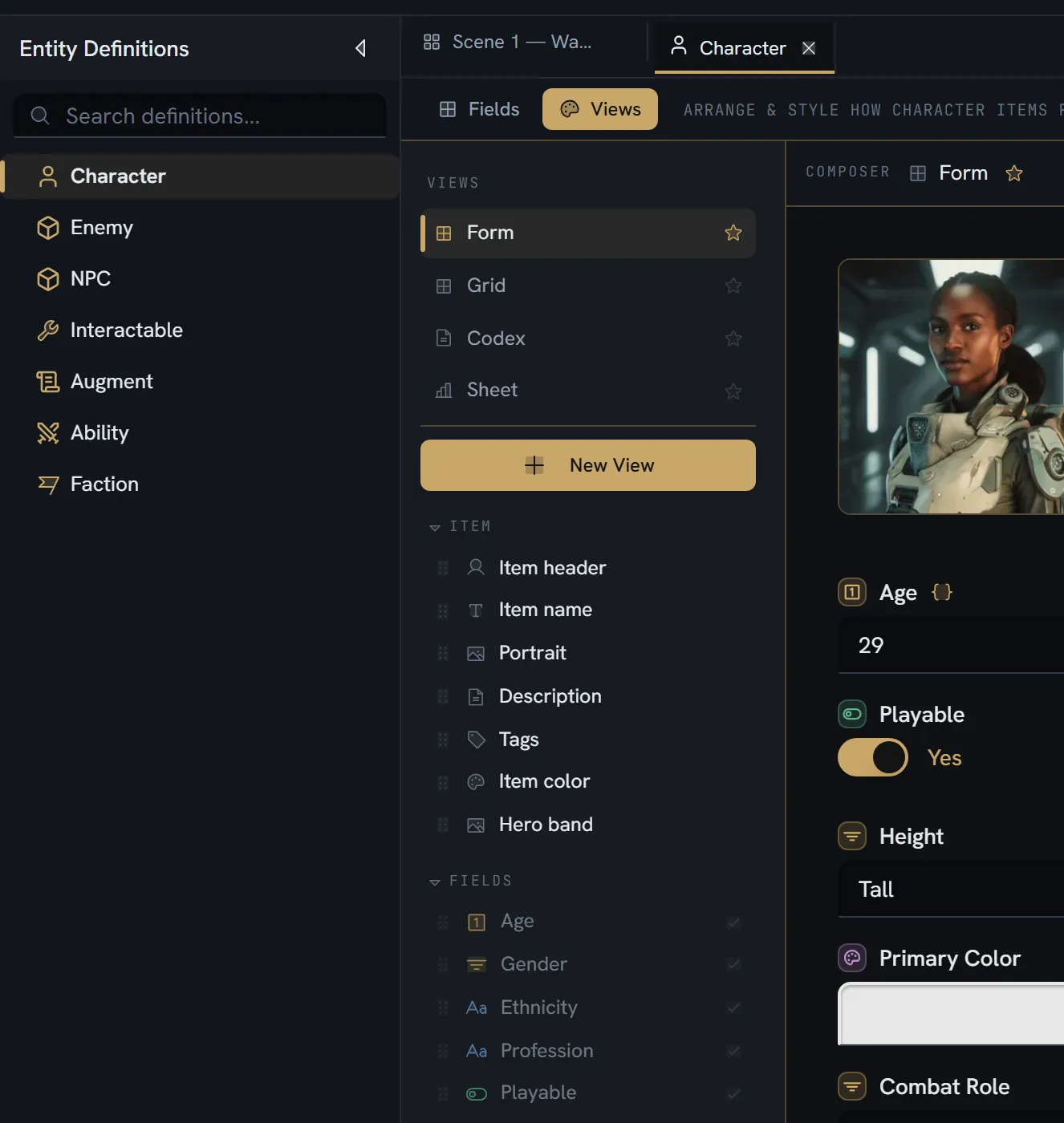
Open the definition and switch to its Views tab. The definition editor has exactly two: Fields and Views.
Every new definition already has one — a Form view, created automatically and set as the default. So the question is never how do I get a view; it is what do I want that the form does not do.
Pick a starting template
The New View gallery offers five cards:
| Card | What you get |
|---|---|
| Form | The item header, then one field grid at the definition’s column count. The classic entry form. |
| Grid | The Form’s structure wearing an editorial reading-column style, with field labels off |
| Codex | A hero band, then a 2:1 split — the description on the left with a lead paragraph and drop cap, an infobox of scalar values on the right, then tags and reference lists |
| Sheet | Portrait and title, a badge row, an Attributes grid drawing numeric fields as meters, then a 2:1 split with a Profile card |
| Blank | One empty section |
Codex and Sheet are auto-derived, with no per-definition setup: they read your fields and lay themselves out. That makes them the cheapest thing to try first — take one and see whether it is already right.
Compose it
The composer is a WYSIWYG editor over the real renderer. The canvas is not a preview: it is the same renderer, drawing the view you are editing over a real item of yours — or a curated sample when the definition has no items yet.
The blocks
| Group | Blocks |
|---|---|
| Item | Item header · Item name · Portrait · Description · Tags · Item color · Hero band |
| Layout | Section · Columns · Grid · Row · Tabs · Heading · Divider · Spacer · Callout |
Field slots are deliberately not in that list — they come from the definition’s own effective fields, which is own fields plus inherited fields plus every applied trait’s.
Moving things
| Gesture | What it does |
|---|---|
| Click | Select a block |
| Drag by the body | Move it |
| Drop on a band between two blocks | Insert there |
| Drop on a block’s edge strip | Wrap the two into a side-by-side |
| Drop on a block’s body | Swap the two |
Alt+↑ / Alt+↓ | Move up or down within its container |
Ctrl+D | Duplicate |
Each selected block gets an inspector with its own settings.
How the layout actually works
A view is a tree of containers, not a canvas of coordinates.
| Block | Child lists |
|---|---|
| Section, Row, Grid | One |
| Columns | One per column |
| Tabs | One per tab |
| Everything else | None — they are leaves |
CSS-grid auto-placement applies inside one Grid block only. If you want two independent grids, use two Grid blocks; a grid does not reach into a nested one.
How a field is drawn — variants
Every field slot has a variant, and auto picks one from the field’s type. Change it when the
default reads wrong.
| Variant | What the reader sees |
|---|---|
| Auto | Resolved from the field’s type — the column below |
| Value | Label and inline control; an em-dash when empty. Hides itself when empty and read-only. |
| Stacked | A key above a bordered input |
| Stat | A big-number card |
| Meter | Key, value/max, and a bar. Uses the field’s own min and max. |
| Pips | A level as a row of dots, one per unit of the range, filled up to the value — ●●○. Press a dot to set the level (the top-filled dot again steps it down). Offered on a number whose max is between 1 and 10 |
| Badge | A coloured pill — options for a select, a switch for a boolean |
| Chips | A wrapping row of pills for a multi-select; None when empty |
| Swatch | A colour chip at rest, a picker when editing |
| Prose | A writing surface, rich for rich text |
| Code | A collaborative code editor — forced for any code field |
| Condition | The visual condition builder — forced for any condition field |
| Portrait | Media tiles |
| List | Rows of avatar, name and a jump arrow |
| Cards | The same as a wrapping grid of cards |
What auto resolves to: text and number and date and vector3 → Value; rich text → Prose;
boolean → Badge; a multi-select → Chips, a single select → Badge; asset → Portrait;
entity → List; colour → Swatch; code → Code; condition → Condition; and every
project reference — variable, tag, board, document, command call — → List.
The inspector only offers the variants that make sense for the field’s type, so you cannot set a meter on a colour.
Labels have three modes: Hide, Inline (a right-aligned key/value row that collapses when empty) and Above.
Style, and how it cascades
Nine settings decide how a view feels. Each can be set on the view, and then overridden on any container or any single block.
| Setting | Options | Default |
|---|---|---|
| Accent dots | on / off | off |
| Accent stat numbers | on / off | off |
| Coloured pills | Never · Value colours · Always | Value colours |
| Meters | Neutral · Accent | Neutral |
| Density | Comfortable · Compact | Comfortable |
| Prose at rest | Editorial · Boxed | Editorial |
| Field labels | Editorial · Form | Editorial |
| Width | Column · Full — view-level only | Column |
| Controls | Seamless · Boxed | Seamless |
The cascade is nearest-wins: the view’s defaults, then every container between it and the block, then the block’s own. A setting you override shows a marker and a Reset to inherited button, so you can always tell what you changed from what you inherited.
Two presets seed the whole set at once: Neutral and Colourful.
Two of the nine are worth understanding rather than trying:
- Field labels: Form adds the canonical label, its type icon, a required marker, and the field’s help text. Editorial drops all of that. It is the difference between a form to fill in and a page to read.
- Controls: Boxed puts a visible control around every value, overriding the variant — except prose, meters, stats and pips, which keep their own shape.
Manage the set
From the same tab: rename a view, reorder the list, delete one, and star one as the default. You can also choose which of your items the composer previews against, which matters more than it sounds — a layout that looks right against your most-filled character often falls apart against your emptiest one.
Which view a reader gets
In this order:
- The view they last chose, remembered in their browser.
- The definition’s default.
- The first view.
- An empty state, if there are none.
So starring a default sets the first impression, not a permanent one: a reader who picks another keeps it.
Views are per definition, not per item. Every item of a definition shares the set — there is no “this one character gets a special layout”.
What a view cannot do
| It cannot | Because |
|---|---|
| Add a field | It binds existing fields by id. Fields are the definition’s. |
| Store a value | It is presentation only. |
| Change what a game receives | Exports read customFields and the item’s data, never a view. |
| Change what the AI sees | Same. |
| Vary per item | Views belong to the definition. |
Limits
Nothing caps the number of views, blocks per view, or nesting depth. No guard reads such a number, on any plan, and views are not plan-gated.
What breaks
| Situation | What happens |
|---|---|
| A field bound by a view is deleted from the definition | The view keeps its shape; the slot has nothing to draw |
| A field’s type changes | The view draws the new type; the old value is parked, not lost — see definitions |
| A definition imported with a legacy layout and no views | It has no view set until one is created. A development-only alignment script back-fills Form views, and it does not reproduce trait-instance grid offsets. |
| A definition has no items | The composer previews against a curated sample instead |