Tags
The tag record, what can be tagged, condition-only tags and the requirement rows they gate, and how a tag reaches a game engine.
All documentation — Variables, logic and commands
Boards and the canvas
The node builder
Modelling the world
Variables, logic and commands
Voice and audio
AI
Working together
Project settings
On this page
The Tags section, Ctrl+5. A tag is a label with a colour. Two jobs: organising things you have
a lot of, and gating a node behind a requirement.
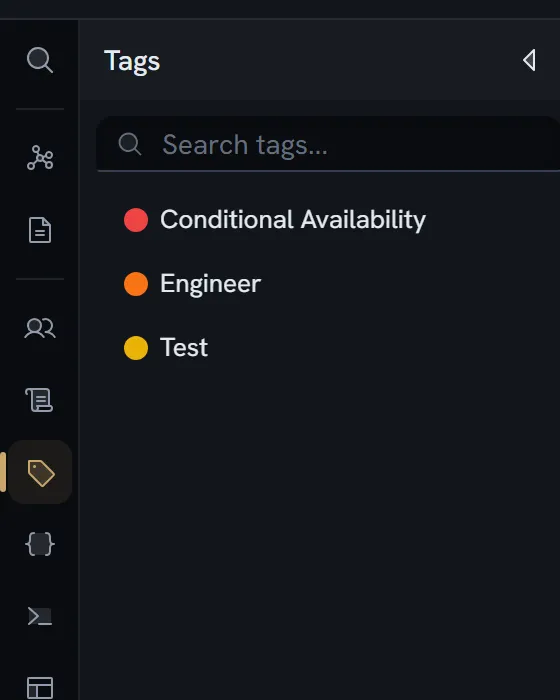
A tag
| Field | Type | Required | What it is |
|---|---|---|---|
id | string | Yes | |
label | string | Yes | |
color | string | Yes | A hex value |
description | string | ||
forConditions | boolean | Used only in conditions — not assignable to items | |
parentId | string or null | Yes | Its folder |
order | number | Yes | |
createdAt · updatedAt · createdBy | Yes |
Colours come from a twelve-entry palette, and a new tag is auto-assigned the least-used one.
The form is one Details section — Name (e.g., Combat, Story, Inventory), Color, Description, and the For Conditions Only checkbox — plus a Usage section.
What can be tagged
Four things carry a list of tag ids: variables, commands, boards and entity items.
Separately, tagRef is a field type: a node field or an entity field can
hold one tag id. That is a different mechanism from the four above — a field pointing at a tag,
rather than a thing wearing a set of tags.
Condition-only tags, and requirement rows
Ticking For Conditions Only removes the tag from every tag selector — boards, entities and the rest — leaving it available for exactly one job: naming a requirement.
The help text is This tag won’t appear in tag selectors for boards, entities, etc.
A requirement row
A node can carry requirement rows, and each row is a tag plus an expression:
| Field | What it is |
|---|---|
id | |
tagId | A tag with forConditions set. This is what a player sees as the [STRENGTH] badge. |
expression | The condition itself |
policy | show or hide — what the player sees when this row is false. Absent reads as show. |
reason | An optional sentence, written by you, replacing the generic explanation |
Rows compose with AND — every row must pass. A route into a node whose requirements fail does not exist.
Two policies, one vocabulary
policy and an exit’s whenBlocked are spelled with the same two words on purpose, and they answer
different questions:
| Authored on | Key | Answers |
|---|---|---|
| An exit | whenBlocked | What happens to this way out when its gate fails? |
| A node’s requirement row | policy | What happens to anything leading here when this requirement fails? |
Both default to show. hide takes precedence across both — if either says hide, the option is
gone. An author meets one vocabulary for what happens to a blocked option, not two.
policy is per ROW, and there is deliberately no project-wide default. One project has too
many different cases for a single setting to be right.
What a blocked option tells the player
The badge is the tag’s label. The explanation comes from the evaluation trace — every operand
with its live value — so a locked option names the variable and its values, reputation 2 / 5,
for numbers, booleans, text and anything else the language evaluates. The expression itself is
diagnostics only and is never shown to a player.
reason exists for the case where the generic explanation reads badly and you want to write the
sentence yourself.
Gates on an exit
Distinct from requirement rows, and both are checked.
| Gate | Where it lives |
|---|---|
| An edge gate | Collaborative text on the edge itself |
| A node-declared exit gate | A field on the node |
Three rules, and the middle one is the one that surprises people:
- No gate at all — passes. The exit is ungated.
- A gate that is present but blank — fails on an exit taken automatically: a resolved gate with an empty expression is an unfilled gate there, never an “otherwise”. On an exit offered to the player it is no condition, and the option is available.
- Anything else — evaluated as a condition.
Whitespace alone counts as no gate for the purpose of the “this exit is gated” affordance in the editor, but the rules above are what the runtime applies.
The browser player and the Unity engine implement these as a matched pair, pinned by shared golden fixtures.
What reaches a game engine
A flat map of tag id to label. Nothing else — not the colour, not the description, not
forConditions, not the folder structure.
A tagRef field’s value resolves to {kind: 'tag', id, label}, with the label already looked up.
Limits
Nothing caps the number of tags, tag folders or requirement rows. No guard reads such a number, on any plan, and tags are not plan-gated.
What breaks
| Situation | What happens |
|---|---|
A requirement row names a tag that is not forConditions | The tag is not offered in that picker |
| A requirement row’s expression errors | The row reads false, loudly recorded in the trace |
| Two requirement rows on one node | Both must pass — they AND |
| A gate that is present but empty | Fails. Use no gate at all for “always”. |
A tag is deleted while a tagRef field points at it | The field renders as a missing reference |
| A tag has no label | It is absent from the exported tag map, and a reference to it resolves to a null label |