Media
The media record, which file types upload and the three size guards that decide, how thumbnails are made, and what a media code actually resolves to.
All documentation — Playing and styling
Boards and the canvas
The node builder
Modelling the world
Variables, logic and commands
Voice and audio
AI
Working together
Project settings
On this page
The Media section, Ctrl+8. Images, video, audio and documents, in a tree of folders.
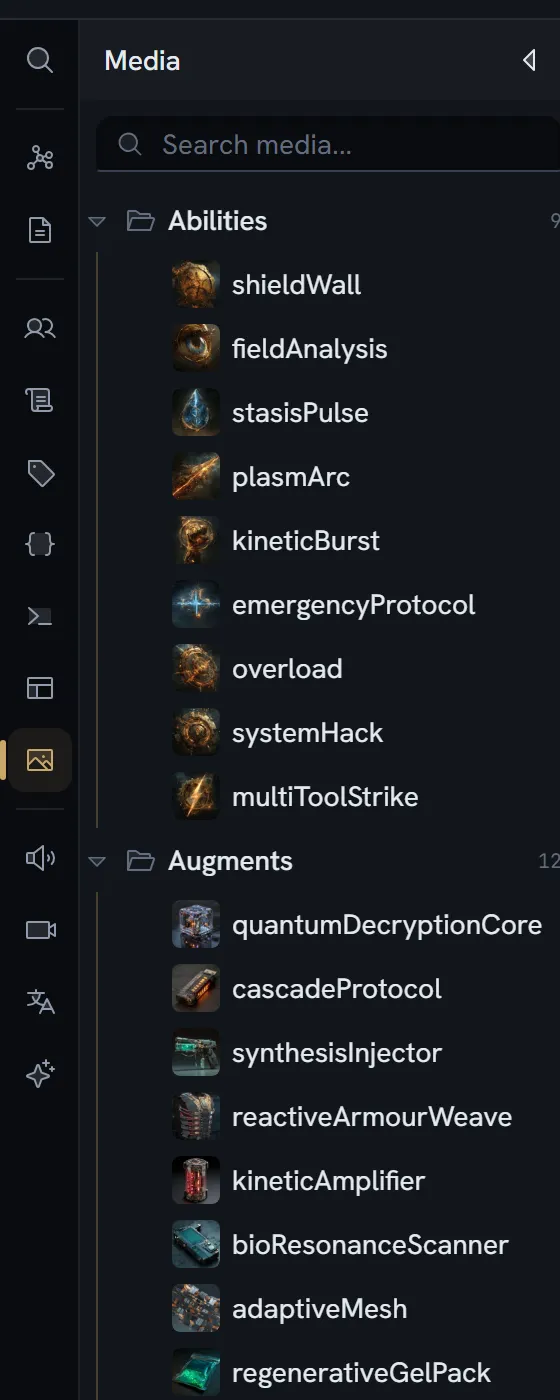
A media item
Every row — file or folder — carries:
| Field | Type | What it is |
|---|---|---|
id | string | |
name | string | The display name |
type | folder · image · video · audio · document · other | |
parentId | string or null | Its folder; null is the root |
order | number | |
createdAt · updatedAt | number | Epoch milliseconds |
createdBy | string |
A file adds:
| Field | Type | What it is |
|---|---|---|
code | string | The stable identifier you own — see below |
size | number | Bytes |
mimeType | string | |
extension | string | Including the dot |
minioPath · mediaId | string | Where the bytes are |
metadata | object | width, height, duration, thumbnail |
The type is derived from the MIME type: image/*, video/*, audio/*, anything containing pdf or
document, then other.
Uploading
What is accepted
| Family | Types |
|---|---|
| Images | JPEG · PNG · GIF · WebP · SVG |
| Video | MP4 · WebM · Ogg · QuickTime |
| Audio | MP3 · WAV · Ogg · WebM |
| Documents | PDF · plain text · Markdown · JSON |
Empty files are rejected. The server derives the content type from the extension, not from what the browser declared — so a PNG mislabelled as a video cannot dodge the image cap.
The three size guards
The effective limit is the smallest of the three that applies to your file.
| Guard | Limit |
|---|---|
| In the browser | A flat 100 MB. It does not know your plan. |
| Per file, by plan | Free is 10 MB. The paid figures are a support answer rather than a published table. |
| By type, at storage | Images 25 MB; everything else 100 MB |
Storage is charged when the upload is authorised, not when it finishes.
Storage per project
Every plan has a storage limit per project — not per organization, and not per seat. It counts more than media: the collaborative snapshot of each document and of the project counts too, so a text-only project consumes it. The figure per plan is on the pricing page.
Refused with: Storage limit reached for this project: your plan includes X per project and Y is already in use. Upgrade your plan or delete some files to free up space.
The figure it compares against is a maintained estimate, reconciled nightly, and it errs toward over-counting — so you are refused slightly early rather than silently allowed past your plan.
Thumbnails
| Source | What is produced |
|---|---|
| Video, in your browser at upload | One frame, seeked to 1 second, max dimension 512, JPEG. Non-blocking — the upload does not wait for it. |
| Images, on the server | Four WebP variants: centre-cropped at 128, 256 and 512, plus a 512 fit. Each is derived from the original, never from a smaller one. |
| Image dimensions | Read in your browser and stored as metadata. Not a thumbnail. |
Serving asks for the server thumbnail first, and falls back to the browser-made JPEG. While one is still being made you get Thumbnail not found. It may still be generating, and the client retries.
Guards on the server side: sources over 30 MB are refused, and there is a pixel ceiling. Generation is idempotent — if all four variants exist, nothing runs.
Usage tracking does not exist
One partial exception: renaming a media code reports how many references it will migrate. That count comes from scanning board nodes’ expression and code fields only — it does not scan entity items, asset field values or documents. Read it as how many expressions name this code, not as where is this file used.
Media codes
A code is the stable name you give a file so an expression can refer to it. It must match
[a-zA-Z_][a-zA-Z0-9_]* — a letter or underscore, then letters, digits and underscores. No spaces,
no dots.
A code is minted at upload from the file’s name, camel-cased, with _1 and _2 appended on
collision. It is unique per project, ignoring case and underscores (doorOpen and door_open
clash). Renaming the item does not touch the
code; changing the code is its own action, and it migrates the expressions that name it.
What a code resolves to
In an expression, a media code is a bare identifier in the same namespace as variables, entities, contexts and enum values.
What a game engine receives — two different things
| Stage | What the code does |
|---|---|
| Code generation | The code becomes the name of a generated constant, whose value is the file’s path |
| The runtime payload | The code is absent. A media reference arrives as {kind: 'media', mediaId, url}, and the payload’s media table maps ids to locations. |
A game cannot obtain a media code at runtime. It resolves a media reference through an id. The code is a build-time convenience for naming constants, not part of the runtime contract.
url is a relative path for an engine build and a signed URL for a share link — the two producers
answer differently on purpose.
Limits
| Limit | Enforced by |
|---|---|
| Per-file upload size | A plan guard, plus a per-type storage guard |
| Storage per project | A plan guard, against a maintained estimate |
| Number of media items | Nothing. No guard reads such a number, on any plan. |
What breaks
| Situation | What you see |
|---|---|
| A file type outside the accepted list | Rejected in the browser |
| A file over your plan’s per-file limit | File exceeds NMB upload limit. Upgrade your plan for larger uploads. |
| An image over 25 MB | Refused at storage, whatever your plan |
| The project is out of storage | Storage limit reached for this project… |
| A thumbnail is not ready yet | Thumbnail not found. It may still be generating — the client retries |
| Audio or a document | No thumbnail is ever requested |
| A code that is invalid or already taken | Refused before the write begins |
| Deleting a file something references | No warning. Nothing checks. |