The node builder
A node type is project data. What one is made of, the builder at a glance, the destroys-nothing guarantee, what reaches a game engine, and where each page is.
All documentation — The node builder
Boards and the canvas
The node builder
Modelling the world
Variables, logic and commands
Voice and audio
AI
Working together
Project settings
On this page
The Node Types section. Its list is the tree of your types, and clicking one opens it in the builder as a tab; the Palette button in the list’s title row opens a Palette tab (which types appear in the canvas’s radial menu and toolbar). This page is the overview — what a node type is, what one is made of, the guarantee people come looking for, and the contract a game engine receives. Each part of a type has its own reference page, listed at the end.
”Built-in” is not a category
A new project is seeded with a standard pack of eight node types, and every one of them is ordinary project data: editable, deletable, and yours. All eight appear in the canvas’s palette on a new project.
| Type | Code | Description |
|---|---|---|
| Text | Text | A free-form text card |
| Board | Board | Runs another board, then continues here — with the entities it contains |
| Dialogue | Dialogue | A line of dialogue spoken by an entity |
| Entry | Entry | Where a conversation starts |
| Branch | Branch | Splits the flow down the first matching condition |
| Jump | Jump | Continues the flow at another node |
| Element | Element | A media or entity element |
| Code | Code | Runs an expression when the flow reaches it |
Two node types are deliberately not in the pack and are not editable: Group (the collapsible frame) and the placeholder shown for a node whose type is missing. The test for exclusion is whether a type is a story element at all, not whether it is complicated.
A node type
Five things, and each has a page.
Identity. A name, which people see; a code, which exports and generated code use and which follows the name until you edit it; a description; whether the type is available to AI and the guidance the AI gets; and a place in the Node Types tree. Creating, copying, renaming and deleting a type, and the palette, are managing node types.
Items, in a header and a body. A type’s content is a list of items in two regions. Most items are fields — a value of one of the field types, from text to a place on a picture — and the complete table of types, their configuration and defaults is fields. The other kinds of item — headings, rows, repeaters, traits, decorative elements, actions, references, radars and totals — with repeaters and rows in full and where every value is stored, are the body.
Per-field presentation. How each field is drawn and edited on the node — its label, reading, width, editing mode, when it is hidden, and the ways a value can be drawn as — a word, a pill, a meter, a portrait, a map, a record — is presentation.
Appearance and size. The header band, body layout, colour and the entity tint, silhouette, rail, outline and corner marks, overflow, and the size rules — every key of the type’s appearance and the closed sets each accepts — is appearance.
Connections and flow. Whether nodes of the type can receive and initiate, how many outputs they have, custom handles, and the In play mode: read-out that says what play mode will make of the type as you edit it, is connections.
The builder at a glance
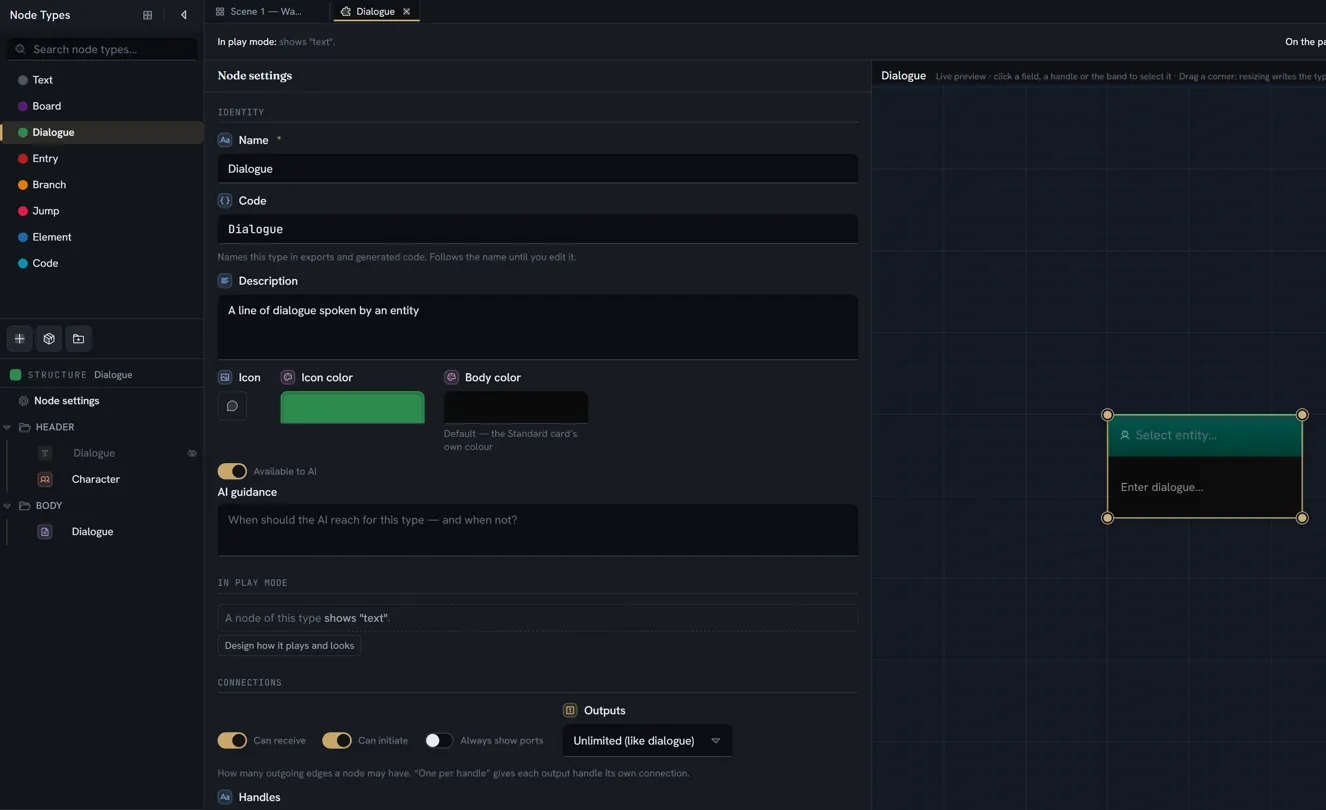
A type opens as a tab, and its structure appears in the drawer. The drawer is two trees with a splitter between them: the Node Types tree on top, and under it Structure, headed with the open type’s name. The Structure tree holds a Node settings row, then a HEADER and a BODY folder; a row or a repeater is a folder of its own, with a chevron and its items inside it, and a cell or a handle is a leaf. One + button sits in the tree’s footer, captioned with where the new item will go — under Body, inside Outcomes — and follows what you have selected. It opens a menu of what that level can hold — Field, Repeater, Row, Heading, Element, Action, References, and Trait once the project has one — each with a one-line meaning; inside a row or a repeater the menu is shorter and also offers a Handle. The same entries are on a folder’s right-click menu.
The tab itself is the inspector — one column of fixed groups showing the one thing selected: the type’s settings, or a single item, wherever it sits — with the live preview above it: a real node of the type on a real canvas, drawn as a band across the top of the tab that you can drag taller or shorter. Give the tab more room and the preview moves to a full-height canvas column on the right of the inspector. Click a field, a block, a handle or the band on the card and it is selected; click the type’s name above the card to rename it; drag a corner and the type’s width is written. Hide preview at the top right folds the preview away and becomes Show preview.
Across the top of every type tab, one line says what a node of the type will do when played (In play mode:) and where the type sits on the board’s menus (On the palette:).
There is no Save button. Every change is written when it commits — at once for selects, switches
and colours; when you pause, leave the box or press Enter for text — and each commit is one undo
step. Ctrl+Z reverts one; the History panel lists them. Two red banners can appear across the
top of the tab — one for export-code problems, one naming a field that is edited in a dialog nothing
opens, with a one-click fix — and neither blocks a write.
The whole path through the builder, on a worked example, is build a node type.
Changing a type that has nodes already
A type change destroys nothing. Three mechanisms make that true:
- A value whose shape no longer fits its field reads as empty — the node accepts the new kind of value at once, and nothing is converted.
- The displaced value is parked on the node, in
archivedValues, keyed by the field and the type it was written under. Change the field back and it returns. - Clean unused data… — the one action that removes a parked value for good, with the confirm Clean unused data? and the counts of what it will remove.
A removed field’s values stay on every node too. Add a field with the same code and type and the builder offers Reclaim removed data at the top of its inspector; nothing comes back until you press it. The full account — the confirmations, the twenty-field memory, what a repeater cannot do — is managing node types.
What reaches the engine
A node type is exported as an EngineNodeType:
| Field | Meaning |
|---|---|
type | The type id |
code | Your raw code. Advisory only. The builder keeps a code valid and unique as you type it, but the format does not enforce that — a pasted or imported type can carry a duplicate or an invalid one — so this is kept purely so a diagnostic can name what you typed. |
className | Sanitised and unique across the payload. Generators use this, never code. |
label | |
fields | One template per declared field — not per instance |
repeaters | One template each, becoming a list type in generated code |
presents, entryPoint |
A field template carries id, code, memberName (sanitised, unique within its namespace),
label, type, storage, the repeater it belongs to (null for node-level), multiple,
presentable, and two three-state flags worth knowing:
decimal—falsemeans declared a whole number; absent means not declared at all.enumRef— present only for a select backed by an enum or bitmask. Its absence is how a generator knows to emit a plain string for a select with inline options.
A repeater template carries id, code, className, label, min and max.
The game side — reading a node, resolving its fields, and what the generated C# looks like — is the Unity plugin’s documentation.
Limits
Nothing caps the number of node types, fields per type, repeater blocks, or items in a body. No guard enforces one. The few caps that exist are each on their own page — the clipboard and the reclaim memory under managing, the ten-pip ceiling under presentation.
What breaks
The cross-cutting cases. Each page carries its own.
| Situation | What happens |
|---|---|
Two node types share a code | The builder prevents it as you type; a paste, an archive or two people naming types at once can still produce one. Within a couple of seconds the later type is re-coded (_1) and a notice says so, by whoever has the project open with edit rights (or when it is next opened). A sync taken before that still compiles — the export numbers the generated className — but the diagnostic naming your code will name a duplicate. |
| A node’s type is deleted | The node renders as a placeholder rather than disappearing, and heals when the type returns |
| A field is removed from a type | The nodes’ values are parked, not deleted. Re-add a field with the same code and type and the builder offers to reclaim them. |
Where next
| Page | What it holds |
|---|---|
| Build a node type | The tutorial — a Skill check type from nothing to a node on a board, in about twenty minutes |
| Managing node types | The section and its tree; the Start from sheet, duplicating, copying and pasting a type; the library; the code rule; the Palette tab; deleting a type; the destroys-nothing rule in full; undo |
| Field types | Every field type, what each can be configured with, its defaults, and what it stores |
| What a node body holds | The eleven kinds of item, repeaters and rows, and where every value is stored |
| How a field is shown | How a field is drawn and edited on the node — labels, readings, widths, editing modes, visibility |
| Appearance and size | The header band, body layout, colour and tint, silhouette, marks, overflow and size |
| Handles, ports and flow | Receiving and initiating, outputs, custom handles, and the In play mode read-out |