Casting characters
Give each character a voice, find who is not cast yet, re-cast a character and re-record their lines safely, and teach the voices to say your invented names.
All documentation — Voice and audio
Boards and the canvas
The node builder
Modelling the world
Variables, logic and commands
Voice and audio
AI
Working together
Project settings
On this page
Casting a character is what makes every one of their lines sound like them. It happens in one place, the Cast page, and it is per character — a line is always spoken by its speaker’s voice, with no per-line picker and no naming convention to follow.
Make the voices first: designing a voice.
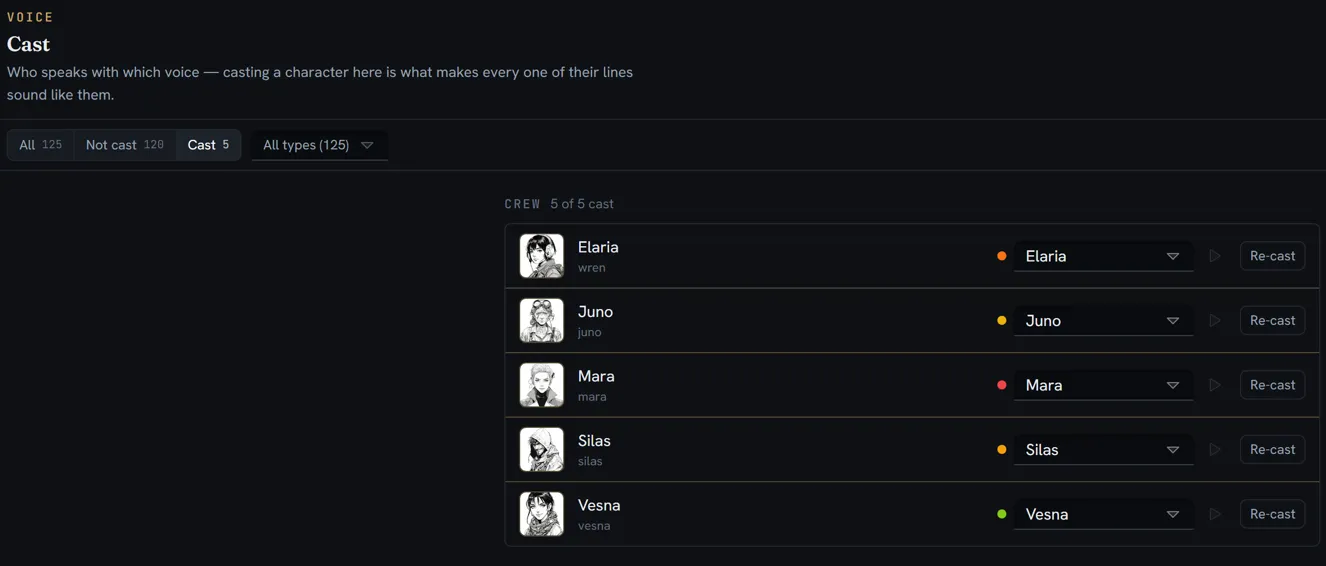
Cast a character
- Open Voices on the rail and click Cast in the list’s title row. The Cast page opens as a tab.
- Find the character. Every entity is listed, grouped by its definition, with its portrait (or its initial), its name and its code.
- Pick a voice in the row’s picker. No voice uncasts them.
- Press the play button beside it to hear who they sound like. It plays the voice’s reference take, never one of the character’s lines.
The count in the header — 4 / 12 cast — is how far along the casting is. Leaving an entity uncast is normal; most entities never speak.
Changing the picker re-records nothing. Lines the character already has keep their audio; the new voice is used the next time a line of theirs is generated. To replace the audio they already have, re-cast them (below).
Find who is not cast
| Control | What it narrows to |
|---|---|
| All · Not cast · Cast | By cast state, each with its count |
| The entity-type picker | One of your definitions — All types, then each definition with its count. Shown when more than one type is listed. |
| Search by name or code | The header’s search box |
| Clear | Resets all three |
Different voices for different languages
Casting stays per character: the character keeps one voice in every language. What changes per language is the voice — a voice can be cast separately for a language, with its own design. See cast it per language.
Re-cast a character
Re-cast sits on the row of every character who is cast. It gives the character a different voice and re-records the lines they have already spoken — the one sanctioned way to replace audio across a whole character.
-
Press Re-cast on their row. The dialog reads Re-cast «name».
-
Choose the voice in To. From shows the current one.
-
Read the breakdown. Before anything runs, it counts every line the character speaks, on every board and in every language:
Row What happens to it drafts Replaced in the new voice never recorded Generated for the first time approved takes Left alone — unless you tick Re-record the approved takes too imported recordings Never touched, in any mode not translated yet Nothing to record -
Press Preview 5 lines to hear the new voice on the first lines of the work. Heard, not kept — nothing was written to any line. The button shows what the preview costs.
-
Press Re-record N lines. The button shows the estimate; the progress reads Re-recording «name» · 3 of 40, with Stop.
When it finishes, a note says how many lines were re-recorded and what it spent, how many failed, how many imported recordings were left untouched, and any direction the new voice could not perform.
Nothing is lost either way:
- A re-recorded line keeps its old take, in its take history. Ticking Re-record the approved takes too demotes each old approved take to was approved rather than deleting it.
- Each line is saved as it finishes. Stopping halfway leaves every finished line in the new voice and every other line as it was, each take labelled with the voice and engine that actually spoke it.
- Running the re-cast also casts the character to the new voice, if you changed it.
Teach the voices your names
Under the cast list, How names are said is the project’s pronunciation dictionary. Invented names are respelled for the voices to read, and printed for a studio so they say them the same way.
- Type the name in the first box — Kyzil.
- Type how it is said in the second — KIH-zil.
- Press Add, or
Enter.
| To | Do |
|---|---|
| Change a respelling | Edit it in place |
| Remove an entry | The × at its end |
| Fix a name already listed | Add it again — it replaces the old entry, ignoring case, rather than adding a second |
| Find names that need one | Show N names with no pronunciation lists the entity names the dictionary has not been taught. Clicking one fills the first box. |
The respelling is used only when audio is generated — your text is never changed, on a node, on the screen or in an export. It applies to every voice in the project, and the names a recording script uses travel with it as a separate pronunciation file (see working with a studio).