Handles, ports and flow
Every handle option, typed ports, the connection policy and its promotion rule, what makes an exit or a branch row, and the play-mode read-out.
All documentation — The node builder
Boards and the canvas
The node builder
Modelling the world
Variables, logic and commands
Voice and audio
AI
Working together
Project settings
On this page
- Handles
- Where a handle can live
- The default set
- Every option on a handle
- Interior anchors
- Port ids, in user terms
- Typed ports
- Connection policy
- The promotion rule
- With no handles declared
- Exits, options and branch rows
- Where an option’s text comes from
- The four behaviours
- The reason on a wire
- The “In play mode” read-out
- What is set in play mode instead
- AI settings
- What reaches the engine
- Limits
- What breaks
A node type declares what it can connect to — its handles and its connection policy. Play mode and the game engine then derive how the story leaves a node from the type’s structure: which rows and repeater blocks carry an output handle, which of those carry a condition, which carry text. Nothing reads the type’s name. A type called Branch branches because its blocks have a condition and a port; a type called Note would branch just the same if you gave it those.
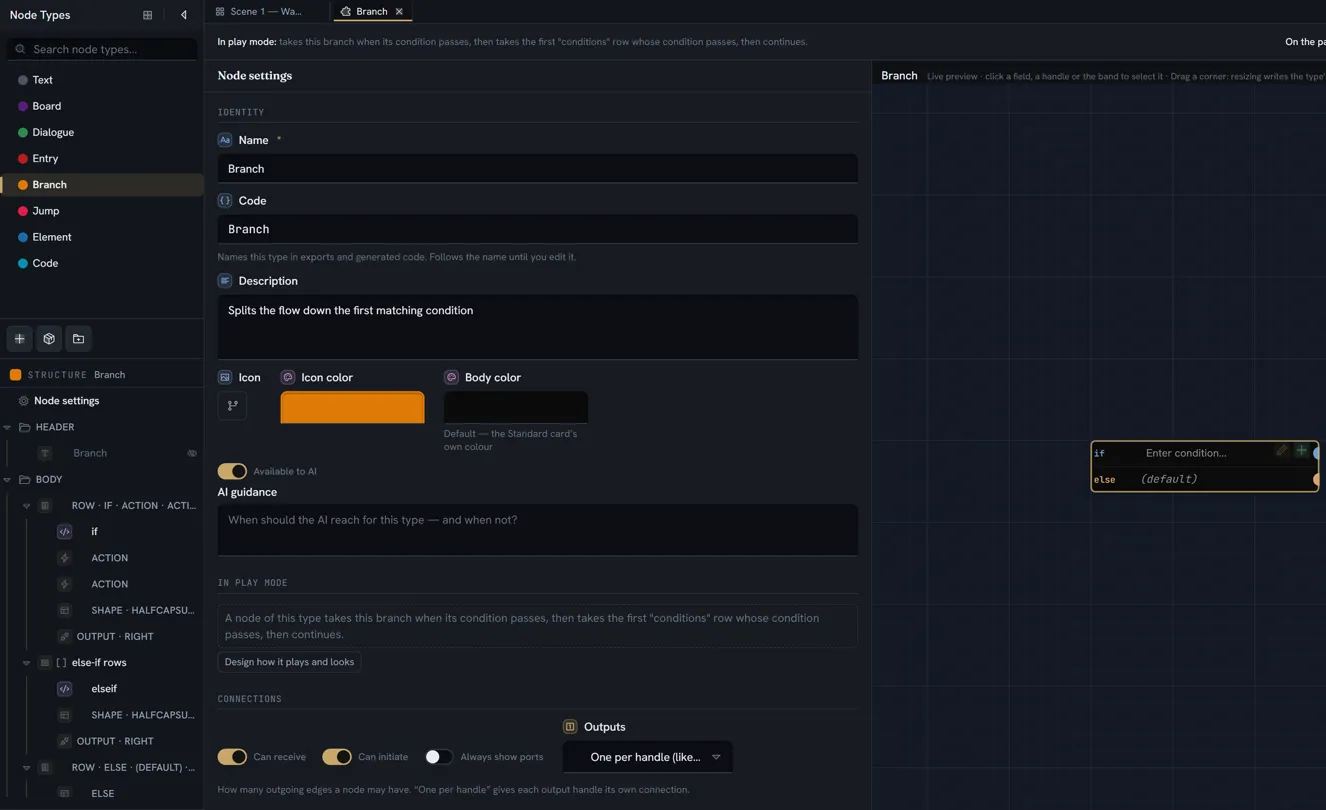
This page is the reference for that declaration. The board side — edges, the exit record, the gestures — is boards and the canvas; the tutorial that builds a type with real exits is build a node type.
Handles
A handle is a place a wire can attach. On the canvas it is drawn as a port.
Where a handle can live
| Where it is declared | The control | What it becomes on a node |
|---|---|---|
| On the type, under Node settings › Connections › Handles | Customize handles, then Add handle | A port on the node’s perimeter — or, anchored to an item, beside that item |
| On a row, under its Exits group | A handle on this row is an exit — like a branch condition. — Add handle, or, with the row selected in the Structure tree, the tree’s + › Handle or the row’s right-click Add handle | One port on that row |
| On a repeater, under its Exits group | Each block becomes an exit when it has a handle. — Add handle, or the same + › Handle / Add handle with the repeater selected | One port per block a writer adds — a node with four outcomes has four |
Only the last two kinds can become exits. A handle on the node itself is a port and nothing more — see exits, options and branch rows.
A row’s or a repeater’s handle is a leaf in the Structure tree, inside its row or repeater, reading OUTPUT · RIGHT or the label you gave it. Click it there, or on the preview, and its card opens in the inspector, headed Handle, with Outcomes › Exits on its first line to say where it belongs. A handle on the type itself is not listed in the tree: its card lives in the Handles list under Node settings › Connections, one card per handle.
The default set
A type that declares no handles gets four: one per side, all Both ways — the caption reads Default 4 handles (one per side). Customize to add, move, or restrict points — like the branch node. Customize handles seeds those same four as editable handles; Reset to default returns to the implicit set. Once customised, Add handle adds one on the right, output-only, full-side.
Every option on a handle
| Control | Values | Default | What it does | Where it applies |
|---|---|---|---|---|
| Label | free text — Handle label (optional) | none | A name drawn beside the port. The label is always visible, even while the port itself is hover-revealed. The bin beside it is Remove handle | every handle |
| Side | Left · Right · Top · Bottom | Right on a new handle; Bottom for a block handle on a horizontal repeater | The face of the node the port sits on. For an interior port it is the direction the wire leaves in | every handle |
| Kind | Both ways · Input only · Output only | Output only on a new handle (the four defaults are Both ways) | Whether the port can start a wire, receive one, or both. Only Output only and Both ways can be an exit | every handle |
| Color | a colour, or cleared | the handle colour of the theme | The port and its label | every handle |
| Placement | Full side · Fixed point · Anchor to item | Full side | Full side fills the edge — several on one side overlap. Fixed point is a position along the side. Anchor to item tracks a field or a static element and moves with it | node handles only; Anchor to item is offered once the type has an item to anchor to |
| Offset | Percent (0–100) · Pixels from start or from end | 50% | Where along the side a fixed point sits | Fixed point |
| Size | Auto · Fixed (16–120 px) | Auto, proportional to the node | The length of a fixed-point port | Fixed point; ignored for a full-side or anchored port |
| Port sits | On the node’s edge · In the row (own gutter) · On the control’s edge | On the node’s edge | Where an anchored port is drawn — see below | anchored node handles; every row and block handle |
| Placed on the picture | on / off, and Which picture the door is on when the type has several | off | A door: the exit sits at a point ON one of the type’s pictures — a pill with the label and the dot, dragged where it belongs on the node — and its wire leaves on the side that half of the picture faces (left of centre leaves left). The wire’s condition prints on the pill as a code pill. The picture must be shown as a Map (Shown as); a door on a picture shown any other way keeps its setting but has no surface, so the exit sits on its Side like any other until the picture is a map again — the row says so. This is the door every node of the type shares; a door each node names for itself is a row — a repeater whose block has a Position on the picture and an exit handle needs no setting here, its rows draw as doors by shape | node exit handles, once the type has a picture shown as a map |
| Shape | Dot · Square · Diamond · Chevron · Bar | Dot | The silhouette of an in-body port. Ignored on the node’s edge, which always draws the capsule | the two interior placements |
| Dim while unwired | on / off | off | Draws the port faded until something is connected to it | the two interior placements |
| Max connections | a positive whole number, or blank — Unlimited | blank = unlimited | A cap on this port, counting its own side — outgoing on an output, incoming on an input. It is the only cap that can bound an input. Zero or less clears it | every handle |
| New wires take this port’s colour | on / off | off | A wire dragged from this port starts in the port’s colour instead of the board’s edge colour — its Color when one is set; on an exit row of a type whose exits are drawn as a list, the colour of the exit’s kind. The wire is then an ordinary wire: recolour it from its own menu whenever you like, and the port never changes to match. A port with neither colour has none to lend, and the switch changes nothing | every handle that can start a wire (Output only or Both ways) |
| New wires are | Solid · Dashed · Dotted | Solid | The line a wire dragged from this port starts with — the way a board can say this branch is gated with a dash, or this is an option with dots, without a word. Like the colour, it is set once, at creation: the wire’s right-click menu has the same three choices under Line, so any wire can be changed afterwards, and the port never changes to match. Solid means the wire is drawn like every other and nothing is written | every handle that can start a wire |
| Always show handle | on / off | off | Draws the port at rest instead of revealing it on approach. In the builder’s preview the handle you have selected stays visible while it is selected; every other port reveals on approach exactly as on a board | every handle |
| Vertical label | on / off | off | Writes the label top to bottom, for a left or right port whose name would take too much width | a labelled handle on Left or Right |
| Tags | words, comma-separated — untyped | blank = untyped | The type labels this port provides — see typed ports. Under the card’s collapsed Advanced group | every handle |
| Accepts | words, comma-separated — anything | blank = anything | The tags a wire must provide to land here. Under Advanced too | every handle |
A row handle and a block handle have no Placement, Offset or Size: they are anchored to their row by construction, so Port sits applies to them always.
Interior anchors
An anchored port has three places to be, chosen with Port sits:
| Port sits | Where it is drawn | What it takes |
|---|---|---|
| On the node’s edge | The row’s position is projected onto the node’s side; the port lives on the perimeter | nothing |
| In the row (own gutter) | Inside the body, in a reserved column at the row’s end on the chosen side. It never overlaps a control | that column’s width on the row |
| On the control’s edge | Inside the body, straddling the control’s own border the way a perimeter port straddles the node’s | nothing |
The two interior placements are what Shape and Dim while unwired are for: an in-body port is a free-standing button, and its silhouette and colour can carry meaning — reward, failure, go to — in a way a perimeter capsule cannot. Side still matters for an interior port: it is the direction the wire departs in, so a port on the control’s left edge sends its wire leftward rather than taking the shortest way out of the box.
A port anchored to an item dies with the item. Delete the field or static element it tracks, and the handle is removed in the same step.
Port ids, in user terms
You never type a port id. The builder mints one when you add a handle and keeps it for the handle’s lifetime, and that id is what an edge remembers — which port it left by and which it arrived at. Rename a handle’s label freely: edges follow the id, not the label.
A block handle’s port is minted per block: its id combines the repeater, the block and the handle, which is why adding or removing a block never disturbs the wires of the others. A row handle’s id is used as-is — a row exists once, so there is nothing to disambiguate — and that is what lets a field move into a row without invalidating any edge already wired to it.
Typed ports
Tags are a free vocabulary. Any word will do — reward, questGate, entity — and a
field-type name is matched exactly like any other word, not treated specially. There is no
reserved “flow” tag: an untyped port is the permissive default, and every board that never declares
a tag is untouched.
| The port you drop on | The port the wire comes from | Result |
|---|---|---|
| Accepts nothing in particular (blank) | anything, tagged or not | connects |
Accepts reward, item | provides Reward | connects — matching ignores case |
Accepts reward, item | provides gold | refused |
Accepts reward, item | provides nothing (untyped) | refused — an untyped source provides nothing, which is the point of declaring a filter |
The filter belongs to the end you drop on, and the tags to the end you drag from. Because most handles are Both ways, that is decided per drag, not per handle: put Accepts on the port that should be choosy and Tags on the ports that should satisfy it.
Casing is kept exactly as you typed it — the builder shows back what you wrote — and compared
without regard to it, so Condition on one type and condition on another are the same tag.
How a refused drop looks. While you drag, a port the wire may land on lights up in the accent colour and the node gets a ring; a port that refuses it turns red-tinted and the wire does not snap to it. Release there and nothing is created. No message is shown; the port’s colour is the whole answer.
Connection policy
Under Connections, the third group of Node settings, four settings on the type:
| Setting | Values | Default | What it does |
|---|---|---|---|
| Can receive | on / off | on | May a node of this type be the target of an edge. Off makes the type an entry point — the hint reads Off = entry-like, outgoing only — which is also what makes it selectable in Game Start and offered as a way into a board. Unless Can initiate is also off: then the type is a port-less annotation, and no way in |
| Can initiate | on / off | on | May a node of this type be the source of an edge. Off is Off = jump-like, incoming only: no drag can start from the node at all. Off together with Can receive off makes an annotation, not an entry point — a way in must also be a way on |
| Always show ports | on / off | off | Every port of this type is drawn at rest rather than revealed on approach — the whole-type form of a handle’s Always show handle. The hint: Resting capsules on every port (default: reveal on approach). Costs some smoothness on very large boards. |
| Outputs | Single output · Unlimited (like dialogue) · One per handle (like branch) | Single output | How many outgoing edges one node may carry — How many outgoing edges a node may have. “One per handle” gives each output handle its own connection. See below |
Outputs is a rule about the whole node, and it composes with a port’s Max connections: both are checked, and the stricter one wins.
| Outputs | What you can wire | What the canvas does at the limit |
|---|---|---|
| Single output | One outgoing edge in total, whichever side it leaves by | Once the edge exists, no drag can start from the node |
| Unlimited (like dialogue) | Any number of edges; one port is reused for as many as you draw | Never limits. Each edge becomes its own option in play, labelled by the edge |
| One per handle (like branch) | One edge per output-capable port | A perimeter port that already carries its edge is hidden until that edge is removed; an in-body port stays drawn but will not start a drag. The node stops offering a drag once every output port is used |
The promotion rule
The canvas and the AI catalogue read an effective policy, and it promotes Single output to One per handle whenever the type actually declares independent outputs:
- any repeater block carries an output-capable handle (Output only or Both ways), or
- the node’s own handles plus its row handles, counted together, include two or more that are output-capable.
The builder says so. The moment you give a repeater block a port, or press Customize handles on a single-output type (which seeds four Both ways handles), the Outputs menu is replaced by a read-only cell naming the cause — one per block of Outcomes (derived), or one per handle — two or more outgoing handles (derived) — whose tooltip reads The handles decide this: a repeater block with an outgoing handle, or two or more outgoing handles, give every output its own connection. Remove them and the stored setting applies again. The rule to remember: a type with several real outputs is one-per-handle, and the cell tells you which handles made it so. Only Single output is promoted; Unlimited stays unlimited. The four default handles of a type that never customised them do not count.
With no handles declared
A type that declares no handles at all still connects: it gets the four default ports, and with the default policy it is can receive, can initiate, single output — a node you can wire into from any side and out of once. That is the whole policy of a plain text card.
Exits, options and branch rows
An exit is a way out of a node that play mode and the engine know about. It is computed from the type’s structure and the node’s data, never stored. Three rules produce every exit there is:
- A block or a row with an output-capable handle is an exit. One exit per handle; for a repeater, one per handle per block the writer added. An empty repeater yields no exits.
- An exit whose cells include a gate is a branch row. A gate is a Condition field, or a Code field with Single expression on — the first such cell in the row. A branch row is taken automatically. Automatic exits are tried in the order their rows appear, gated and ungated alike; the first that passes and has a wire is the one taken.
- An exit whose cells include presentable text is an offered option. Text and Rich text cells are presentable; a Select, Number, Entity or any other value cell is data the card draws, never a line the player reads, so it does not make an option.
And one rule that removes a class of exits: a handle on the node itself is never an exit. It is a port. An edge wired from it is followed as the ordinary “next” arrow — ungated, with no text of its own — and none of the play-mode behaviours below can be attached to it.
| Structure | What you get |
|---|---|
| Repeater block with an output handle, a Text cell and a Condition cell | One offered option per block, greyed out or hidden while its condition is false |
| Repeater block with an output handle and a Condition cell | One branch row per block — the first passing row is taken |
| Repeater block with an output handle and a Text cell | One offered option per block, always available |
| Repeater block with an output handle and nothing else | One exit per block, taken automatically. It is an exit but not a branch row — “else, times N” would make every ported list a branch |
| A row with an output handle and a Condition cell | One branch row |
| A row with an output handle and no condition | An authored else: an ungated exit that counts as a branch row. Place it after the gated rows — automatic exits are tried in row order, and an ungated row placed first always wins |
| A handle on the node | A port. Its edges are plain next-arrows |
Where an option’s text comes from
An offered option shows the exit’s own presentable cells. When the row carries no text, the edge’s label stands in, which is how a type with unlimited outputs — a dialogue line with three labelled arrows out of it — offers three options. When neither the row nor the edge has words, an option reads the handle’s own label, so a type whose fixed exits are named on their handles (Won · Failed · Bribed) offers those words without a label on every wire. A handle’s label only supplies words: it never turns an automatic exit into an option, and it is the type’s text, so it is not translated. When a node has several silent exits that are all ungated, all wired and none of them set in play mode, the player is asked to choose between them and each option borrows the destination node’s own name — the text its preview fields give — because taking the first silently would make every other branch the author drew unreachable.
The four behaviours
Every exit has a behaviour, derived unless you set one in play mode:
| Behaviour | The player sees | Derived when |
|---|---|---|
| The player picks it | an option | the exit carries text |
| Taken automatically when its condition passes | nothing — the story moves on | no text, a gate |
| Taken automatically | nothing | no text, no gate |
| Nothing — it is only shown | the row, as content; anything wired to it is never followed | never derived — only by setting it |
Setting a behaviour overrides the derivation for that one exit; it does not change the gate. A gated exit set to Taken automatically still waits for its condition. The port of an exit set to only shown still exists and can still be wired, so you can keep a list on screen and its connections for later.
The reason on a wire
A wire that carries a condition can also carry a reason — one sentence, in the author’s words, for whoever reads the board: needs the workshop key, only once Ryn trusts you. It is written where the condition is: right-click the wire, Condition › Add Condition or Edit Condition, and in Edit Connection Condition the sentence goes in the box under the IF row. It lives on the wire, with the condition, and follows it — delete the wire and the sentence goes with it; the condition and the sentence are two things, so a wire can have either without the other, and a sentence on an ungated wire is kept but shown nowhere.
What reads it on the board is the source card: with the type’s Why locked exit fact turned on
(exit facts), the sentence prints under that wire’s exit, whatever way the
exits draw — under the chip, the card, the table row, the block row. A gated exit whose wire has no sentence prints
nothing there. At play it is the block’s reason: the sentence rides the engine payload as the
edge’s reason, and when that wire’s condition blocks a choice, the Stage, Unity and Unreal show it
as the reason the choice is blocked — exactly as the sentence written on a requirement row of
the node reaches them (the four behaviours, When blocked). It speaks for
the wire’s own gate only: a choice blocked by a row’s own condition shows the values that failed
(a row’s condition has no sentence of its own), and one blocked by a requirement row shows that
row’s sentence — never the wire’s.
The requirement rows’ own Reason box is the precedent — the same idea, one level down: a requirement says why its row is locked, a wire’s reason says why its exit is.
The “In play mode” read-out
Under In play mode — the second group of Node settings — the builder states what a node of the type will do as one sentence — A node of this type runs its script, then shows “prompt”, then offers one option per “outcomes” row. — in the order things happen. The same sentence, minus its first three words, heads every type tab as In play mode: so it is in view whatever is selected, and it changes the moment the structure does — add a handle to a repeater block and shows “prompt”. becomes shows “prompt”, then offers one option per “outcomes” row. It is computed by the same rules the runtime uses, so it cannot disagree with play mode. It is a read-out, not an editor.
| Phrase | What causes it |
|---|---|
| runs its script | the type has a top-level Code field that is not Single expression |
| says nothing | the type has been set, in play mode, to say nothing to the player |
| shows “a” + “b” | the type’s top-level presentable fields, named by their codes. If any of them carries Use as this node’s name, only those are listed |
| offers one option per “X” row · offers an option | an exit that carries text — on a repeater named by its code, or on a row |
| takes the first “X” row whose condition passes · takes this branch when its condition passes | a gated exit with no text |
| continues through each “X” row · continues | an exit with neither |
| only SHOWS its “X” rows · only shows this row | an exit set to only shown in play mode |
| jumps to its target · jumps to its target and comes back | a top-level field set to hand over control, and whether it returns |
| does nothing — it has no text, no script and no outputs, so a player passes straight through it | none of the above |
A phrase you have set in play mode reads in a heavier weight than a derived one, so you can tell what you decided from what the structure implies. The read-out describes the type: it says “one per row” whether a given node has two blocks or twenty, because it never looks at a node’s data. Text inside a repeater block is reported through its exit, not in the shows phrase. And it cannot see edges, so the two things an edge adds — its label standing in as option text, and several silent exits being offered with borrowed names — are not in the sentence.
Below the sentence, Design how it plays and looks opens play mode on a real node of the type. With no such node in the project it says instead: Put one of these on a board, then you can design how it plays and looks.
What is set in play mode instead
Five decisions are stored on the type but are not made in the builder. They are made in play mode’s Design tab, beside the thing they change — an option is configured by selecting it on the stage, and what is not on screen has its own short list. Every one of them defaults to the derived answer, and choosing the derived answer stores nothing.
| Decision | Where in play mode | The controls |
|---|---|---|
| How an exit is left | select the option on the stage, then This option, in play | As it looks — … (the derived answer, spelled out), The player picks it, Taken automatically when its condition passes, Taken automatically, Nothing — it is only shown |
| What a blocked option looks like | the same place, once the exit is one the player picks | When blocked: shown, greyed out, with the reason (the default) · When blocked: hidden. Only meaningful on an offered, gated exit |
| How a playthrough begins here | Starting here — offered only for a type with Can receive off | As it looks — …, The player chooses to start here, The board opens here when its condition passes, The board opens here. The derived answer is the same rule as an exit’s: content offers, a gate branches, otherwise it continues |
| Which field hands over control | Not on screen — one line per Node link or Board link field at the top level | ”Target” hands over control, and beneath it …and comes back here afterwards — a jump, and a call-and-return |
| Whether the type says anything at all | Not on screen | ”Type” says nothing to the player. It silences presentation only: every field is still resolved and still reaches the stage as data, the node draws no step of its own, and its exits still behave as declared — a silent node with nothing to offer is passed straight through |
A field’s Use as this node’s name — set in the builder, on the field — does double duty here: it names the node in the jump picker, search and exports, and it is the presented-content override. With nothing marked, a node presents every presentable field; mark one or more, and those are what the player reads as the step, what the shows phrase lists, and the text another node’s silent exit borrows as this node’s name. The unmarked fields are still resolved and still reach the stage, so a card can draw them; they are only no longer presented. It is the one presentation choice that stays in the builder, because it is not only about play.
AI settings
Two controls at the foot of Node settings’ Identity group decide how the type meets the AI:
| Control | Default | What it does |
|---|---|---|
| Available to AI | on | Off means AI generation never uses this type. A type that is off is not described to the model at all — it cannot reach for what it is never shown — and the generator’s per-run node-type scope can only narrow the set further, never re-admit one. Nodes of an unavailable type already on a board are untouched |
| AI guidance | empty | Shown only while Available to AI is on. Text written for the model — when to reach for this type, and when not — placed after the description in the model’s catalogue of your types |
Description and AI guidance are different fields on purpose: a description is read by a person scanning the type list, guidance by a model deciding what to generate, and one sentence rarely serves both. What the model is told about a type’s connections is derived, not written: its effective policy (whether it can be wired into, and its promoted output capacity) and its output ports by id, label, cap and the repeater they belong to. The board generator’s own scope control is on the AI page.
What reaches the engine
A sync writes the derived facts, not the drawing. What a game receives:
| From the type | On every node | Not sent |
|---|---|---|
presents — whether the type says anything · entryPoint — whether Can receive is off · one template per repeater (id, code, className, label, min, max) | one exit per derived exit: portId, its gate source (or none), the keys of its content, which block it came from, its exitKind (set or derived), its whenBlocked, its pictureKey when it came from a block whose first picture or character is its face · a jump when a field hands over control, with returnAfter · presents, entryPoint, entryKind · choiceTextKeys, the fields an option shows | a handle’s side, position, placement, shape, colour, size, label, tags, accepts and max connections — those are canvas facts. Can initiate and Outputs are canvas rules too |
Edges arrive with the port id at each end, so a game can tell which handle a wire left by — and
one handle legitimately carries several edges, which is why the plugin keys a choice by its own
id rather than by port. An edge also carries its condition and, when the author wrote one, the
reason on a wire as its reason — the sentence a game shows when that
condition blocks the choice. Reading a step’s choices, why one is locked, and writing one handler per
node type are the Unity plugin’s playing pages; the reason an
engine never re-derives what a type means is node meaning is resolved
once.
Limits
| What | Limit |
|---|---|
| Handles on a type, on a row or on a block | Nothing caps it, and nothing enforces one |
| Max connections | Must be a positive whole number. The builder clears zero, a negative or a blank to unlimited; an imported type’s non-numeric cap is cleared the same way |
| Size of a fixed-point port | 16 to 120 pixels, in the builder |
| Tags and accepts | Any number of words; nothing enforces a count or a vocabulary |
| Port ids | Unique by construction — the builder mints them. Nothing checks a pasted or imported type for duplicates |
| Outputs | The stricter of Outputs and a port’s Max connections applies; neither can require a port to be wired, only refuse a wire |
What breaks
| Situation | What happens |
|---|---|
| You drag from a node whose type has Can initiate off | The drag does not start |
| You drag from a Single output node that already has its edge | The drag does not start |
| You drag from an output port of a One per handle node that already carries its edge | A perimeter port is hidden until the edge is removed; an in-body port stays drawn and refuses to start a drag |
| You drop on a node whose type has Can receive off | The target turns red and the wire does not snap; releasing creates nothing |
| You drop on a port whose Accepts the source does not provide | The same — and an untyped source never provides anything |
| You drop on a port at its Max connections | The same |
| You drop on an Output only port | The same; the kind refuses it |
| You drag from an Input only port | The drag does not start |
| You remove every custom handle | The builder says the node cannot be connected; the canvas draws the standard four ports. Use Reset to default |
| You delete a handle that has edges wired to it | The edges are not deleted. They keep their record, are drawn loose to the node’s body, and in play they are followed as plain next-arrows with no gate and no text |
| You delete the field or static element a port is anchored to | The handle goes with it, in the same step |
| You want to set Outputs on a type with a ported repeater, and find a read-only cell instead of the menu | The handles decide it — one per block of X (derived). Remove the block’s handle and the menu returns, with your stored setting |
| You give a node-level handle a wire and expect to set how it is taken | You cannot. A node-level handle is never an exit; the wire is a next-arrow. Put the handle on a row |
| A block has an output handle, a condition cell, and the cell is empty | That block’s exit fails: a present, blank gate is false |
| Several blocks each have an output handle and nothing else, all wired | The player is offered them, each labelled with its destination’s own name, rather than the first being taken silently |
| A type has Can receive off and no presentable field or gate | It is a way in that opens the board here, automatically. With several automatic ways in on one board, the first in board order whose condition passes wins; only a way in that carries text is something the player chooses |
| You read Outputs in the builder to learn what the canvas enforces | While the handles promote it, it shows the effective value and names the cause; otherwise the stored one, which is then also the effective one |