Definitions and traits
The shape of a thing — every field on a definition, the seventeen field types, how inheritance and traits compose, and what a schema change costs.
All documentation — Modelling the world
Boards and the canvas
The node builder
Modelling the world
Variables, logic and commands
Voice and audio
AI
Working together
Project settings
On this page
- An entity definition
- Codes
- Three system fields
- isUnique
- mentionLook
- The field types
- Every field also carries
- Where values actually live
- Reference fields
- entity — a reference to entity items
- The id-valued links
- Traits
- An application
- How composition resolves
- The effective field order
- Two traits declaring the same field name
- What a schema change does to existing items
- Limits
- What breaks
The Entity Definitions section, Ctrl+4. It holds two kinds of thing that share one tree:
definitions (the shape of a character, an item, a location) and traits (a block of fields
that several definitions can share).
The instances are elsewhere — see entities.
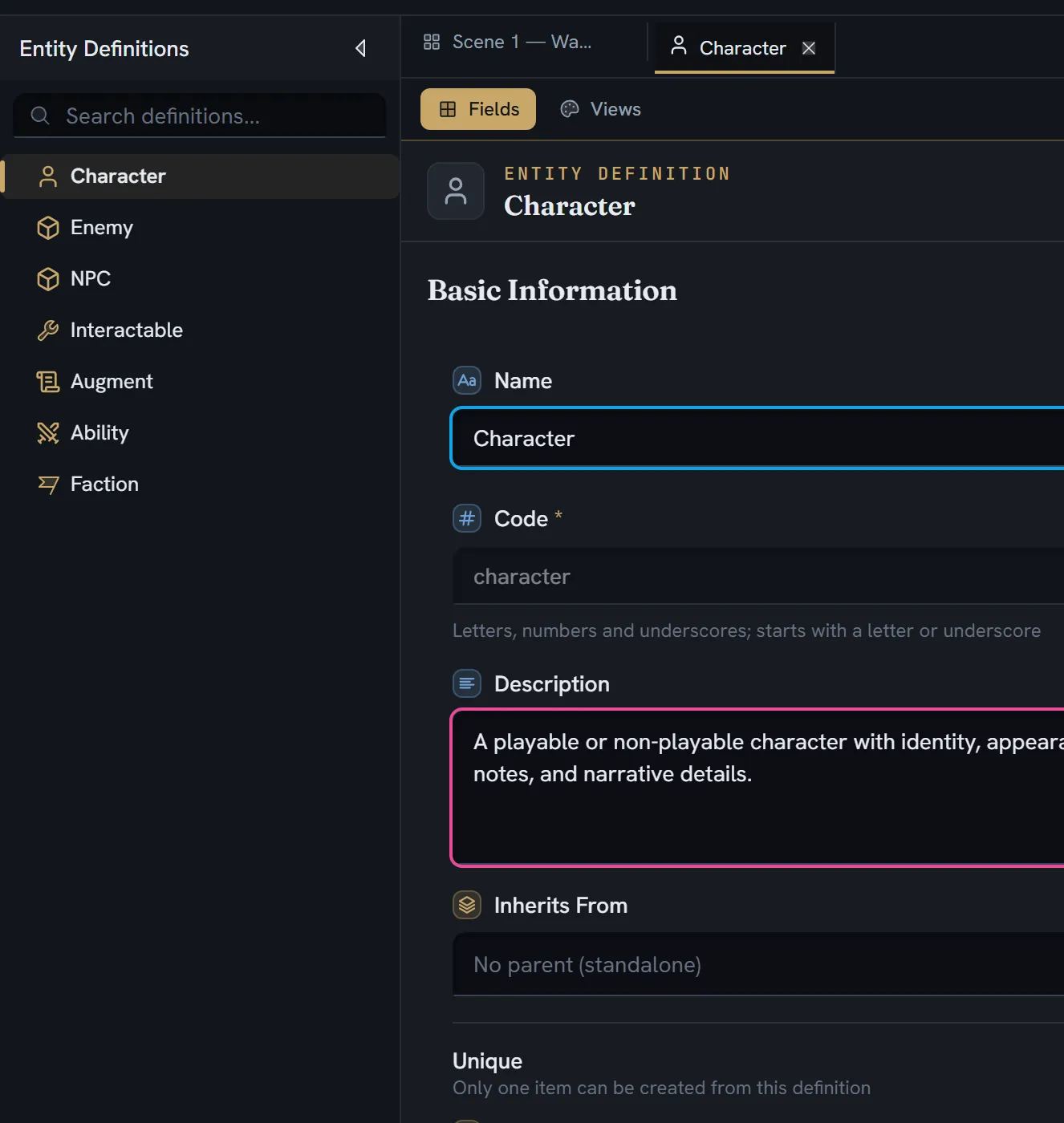
An entity definition
| Field | Type | Required | What it is |
|---|---|---|---|
id | string | Yes | |
name | string | Yes | Character, Item, Location |
code | string | Yes | character — the identifier exports use |
iconSvg | string | Yes | Inline sanitised SVG; empty for none |
iconRef | string | Yes | Where the icon came from: iconify:«set»:«name», asset:«id», or empty |
description | string | ||
pictureId | string | A media id | |
isUnique | boolean | Only one item may ever exist | |
isNameLocalizable | boolean | UI: Allow translation for names. Off: no export or runtime receives a name translation | |
isDescriptionLocalizable | boolean | UI: Allow translation for descriptions. Off: no export or runtime receives a description translation | |
gridColumns | 2 · 3 · 4 · 5 · 6 | Default 3 | |
customFields | field[] | Yes | The fields this definition declares itself |
parentId | string or null | Its folder | |
order | number | ||
inheritFromId | string or null | Its parent definition — a different axis from parentId | |
appliedTraits | applied trait[] | ||
views | view[] | Saved layouts | |
defaultViewId | string | ||
mentionLook | mention look | How an @-mention of one of its records draws. Absent: its name. See below | |
createdAt · updatedAt | number | Yes | Epoch milliseconds |
createdBy | string | Yes |
Codes
A code must match [a-zA-Z_][a-zA-Z0-9_]* — a letter or underscore, then letters, digits and
underscores. No spaces, no dots, no punctuation. The rule exists because a code becomes a member
name in generated C# and an enumerator in C++.
A new definition’s code is uniquified against other definitions. A trait’s code is uniquified against both definitions and traits.
Three system fields
Every definition has name, description and pictureId (labelled Picture) before you add
anything.
isUnique
Labelled Unique, with the help text Only one item can be created from this definition. Once one item exists, creating another is refused.
mentionLook
Labelled A mention draws as, under the toggles: Its name (the default, stored as nothing)
or A keycap — its records are input actions. With a keycap, an @-mention of one of its
records draws as the key, pad button or gesture that performs it, in any rich text — a line, an
item’s description, a choice — on the canvas and in the Stage.
Three more pickers appear, each naming one of the definition’s own fields — not an inherited or a trait one, because the look travels to a share link and to Unity and Unreal with the fields the definition declares itself — and each optional:
| Picker | Stored as | Reads | Drawn for |
|---|---|---|---|
| Key name from | keyFieldId | A text or select field — E, WASD, Mouse Left, Ctrl | Keyboard & mouse |
| Pad control from | padFieldId | A select whose option value is a position: south · east · west · north · lb · rb · lt · rt · ls · rs · lsClick · rsClick · dpad · dpadUp · dpadDown · dpadLeft · dpadRight · start · select | Xbox, PlayStation and Switch, each its own button at that position — east is B on Xbox, the circle on PlayStation, A on Switch |
| Touch gesture from | touchFieldId | A select of gestures; onScreenButton reads as the record’s name | Touch |
A keycap draws a glyph where the glyph set has one: the letter keys, the digits, F1–F12, the
arrow keys, the WASD and arrow clusters, the mouse and its buttons, every pad position and every
gesture. Everything else draws its words in a keycap: a key that prints a word (Ctrl, Shift,
Space, Esc, Enter, Tab…), a key the set lacks (F13), and an on-screen button. A key name is matched in any case and with the usual aliases (LMB, Left Click, ArrowUp). A combo such as Q+E draws one glyph per key only when the set has every key
in it; otherwise it reads as typed. Each pad draws its own buttons — the Xbox letters, the
PlayStation cross, circle, square and triangle, the Switch letters — and a screen reader hears
their names (Cross, LB).
A family whose field is empty draws a dashed cap holding the record’s name, never a blank. The canvas draws the keyboard; the Stage’s Keys as toggle picks the family; a share link draws the keyboard. What these draw is a preview a writer reads: a game draws the player’s current binding, which the plugins’ mention hook lets it supply. The fields are stored by id, so renaming one keeps the look; the engine payload names them by field name.
The Input action definition ships with a keycap look, in two packs: Input actions, which
also brings 26 ready-made actions in a folder Input actions (Move, Look, Jump, Crouch, Sprint,
Interact, Attack, Aim, Reload, Dodge, Block, Use item, Inventory, Map, Journal, Pause, Confirm,
Back, Next tab, Previous tab, Zoom in, Zoom out, Quick save, Quick load, Skip, Talk — each with its
key, pad position and touch gesture filled in), and Puzzles & world, whose Teach card names
an action and brings the definition without any action. Adding both gives one definition: the
second reuses it by its code. An action’s code (Crouch, UseItem) is what a game maps to its
own input action; its name is yours to change.
The field types
Seventeen of the twenty are available on a definition. nodeRef is the exclusion, and it is a
decision rather than an omission: an entity sheet has no board scope for a node picker to work in,
boardRef is the primitive actually wanted, and node ids rot silently where board ids are stable.
position and area — a point and a rectangle on a picture — are canvas-node fields only:
their one editor is the picture drawn as a map on a card, which a sheet does not have.
| Type | Label | Description shown in the picker |
|---|---|---|
text | Text | Single-line or multiline text |
richText | Rich Text | Rich text editor with formatting |
boolean | Boolean | True/false toggle or checkbox |
date | Date | Date picker with optional time |
number | Number | Integer or decimal number |
asset | Asset | Reference to one or more media files |
entity | Entity | Reference to one or more entity items |
select | Select | Choose one or more options |
color | Color | Color picker |
vector3 | Vector3 | 3D position (x, y, z) |
code | Code | Collaborative code or expression |
boardRef | Board link | A link to a board |
documentRef | Document link | A link to a document or spreadsheet |
variableRef | Variable link | A link to a project variable |
commandCall | Command call | Calls a project command, with its arguments |
tagRef | Tag link | A link to a project tag |
condition | Condition | A rule that decides when this applies |
The full configuration table for each — every option and every default — is on the node builder page, because both surfaces read one registry.
The picker groups them as Basic, Numeric, Media, Relations, Selection, Rich Content and Spatial. The group labelled Media is the one holding all five link types, not just assets.
Every field also carries
id, name, label, type, order, required, readonly, isSystem, isVariable, and
optionally source (manual · formula · ai — absent means manual), formula, an AI config,
helpText, an icon (iconSvg · iconRef, the same pair the definition carries, picked with
the same picker from the button beside the field’s label), and a layout of columnSpan,
startColumn and row.
A field’s icon leads its value wherever the value is shown as a stat — in a view on the
entity’s own page and in the same view drawn on a node’s card: ◆ 120 under GOLD. It is
drawn in the definition’s accent on the page and in the type’s colour on a card. Nowhere else
draws it; the field’s label still names it.
A formula-sourced or AI-sourced field is read-only.
Where values actually live
Three storage regimes, and the difference matters when two people edit at once:
| Regime | Types | Where |
|---|---|---|
| text | text, code, condition | Collaborative text, merged character by character |
| richText | richText | A collaborative document fragment, per language |
| scalar | everything else | A plain value on the item |
multiline on a text field affects rendering only — it never changes where the value is stored.
Reference fields
entity — a reference to entity items
| Option | Label | Notes |
|---|---|---|
multiple | Multiple | Allow referencing more than one entity. Toggling it resets the default and clears the item bounds. |
allowedEntityDefinitions | Allowed Entity Definitions | A multi-select of definitions, with Select all and Clear |
minItems / maxItems | Minimum Items / Maximum Items | Only when multiple. Placeholders 0 and No limit. |
The id-valued links
variableRef, tagRef, boardRef and documentRef store a bare id string — not a wrapper and
not a denormalised copy of the label. The referent owns its own name, so renaming it can never
strand the field.
documentRef is the only one with a real option: allowedDocKinds, either richtext or
spreadsheet or both. Absent means every kind, and the default deliberately omits the key rather
than seeding an empty array, so the author narrowed this stays distinguishable from untouched.
That single type is what the builder offers as two menu entries — Document link and Spreadsheet
link.
commandCall is not one of them: its value is a composite of a command id and its arguments. It
needs a real editor rather than a picker, and it is read-only in the entity grid, because a grid
cell cannot carry an object.
A reference whose target no longer exists renders as Missing reference in destructive italic — visibly different from the loading state.
Traits
A trait is a reusable block of fields, stored in the same tree as definitions. You apply one by dragging it onto a definition, which opens a prefix dialog.
| Field | What it is |
|---|---|
name, code, description | Placeholders: Trait Name, trait_code, Describe what this trait represents… |
gridColumns | Default 3 |
customFields | Its own fields |
appliedTraits | Sub-traits |
parentId, order | Its place in the tree |
An application
Applying a trait creates an applied trait with its own identity:
| Field | What it is |
|---|---|
id | A fresh UUID, and part of every composite field id |
traitId | Which trait |
label | Main Weapon Stats |
prefix | mainWeaponStats |
color | Auto-assigned from a ten-hue palette, and editable |
startRow, startColumn, fieldLayoutOverrides | Placement |
The same trait may be applied more than once to one definition. Each application is a separate instance with its own prefix, label and colour.
How composition resolves
Field prefixes join with .; labels join with -. A trait field applied with prefix
mainWeaponStats to a trait field named damage becomes the field mainWeaponStats.damage, and
those chains accumulate through nesting.
Maximum nesting depth is 2: entity → trait → sub-trait. A trait that already has sub-traits cannot be dropped into another one. Self-application and circular references are refused, and so is a trait whose grid is wider than the target or whose fields would overflow it.
The effective field order
inherited fields → trait fields → the definition's own fieldsInherited fields come ancestor-first along the inheritFromId chain, each ancestor’s own fields
sorted by their order. Grid columns for an inheriting definition come from the root ancestor, not
from the definition itself.
Inherited fields are read-only in the definition editor and fully editable on the item form. Trait fields appear read-only in the definition editor.
Two traits declaring the same field name
Nothing collides, by construction. Every trait field’s name is rewritten to prefix.fieldName
and its id is a composite containing the application’s UUID, so two applications of the same trait —
or two different traits with a damage field — cannot produce the same key.
Two guarantees back that up. Prefix uniqueness is enforced per definition when you apply the trait:
- Label cannot be empty.
- This label is already in use on this definition.
- Code cannot be empty.
- Must start with a letter or underscore and contain only letters, numbers, and underscores
- This code is already in use on this definition.
- This code is too close to ”…” on this definition: codes may not differ only by case or underscores.
Label comparison is case-insensitive; a code may not differ from another prefix only by case or underscores.
A prefix is also checked against the definition’s own fields, because both become members of the
generated class: a prefix armor beside an own field armor is refused, and so is a prefix whose
trait fields would generate an own field’s name — body.hp and an own bodyHp both become
BodyHp. The refusal names both: “body.hp” is too close to “bodyHp” on “Monster”: names may not
differ only by case or underscores. Renaming a prefix is held to the same check.
What a schema change does to existing items
A type change destroys nothing. The policy and its three mechanisms:
| You did | What happens to the data |
|---|---|
| Changed a field’s type | The displaced value is parked under the field id and its old type the moment something is typed over it. Change the type back and it returns. Writing a new value of that same type supersedes the parked one. |
| Removed a field | The field goes; the items’ content does not. Nothing cascades. |
| Turned multiline off on a text field | Nothing is destroyed. A cascade that deleted every language’s prose on every item — descendants included — did exactly that until it was removed. |
| Added a field | Defaults are backfilled into every existing item, computed over the effective fields (own, inherited and traits) and applied idempotently. |
| Deleted a definition | Any definition that inherited from it has inheritFromId cleared, then the definition is removed. Its items are NOT deleted. |
| Renamed a field’s code | Atomic: every expression referencing it across every board is updated in one transaction. |
Parked values are deliberately invisible to exports, the AI’s context, play mode and code generation. They exist only where the field is displayed and edited. Reclaiming them for good is the explicit Clean unused data… action, and nothing else.
Limits
What breaks
| Situation | What you see |
|---|---|
| A code with a space, dot or leading digit | Refused — Must start with a letter or underscore and contain only letters, numbers, and underscores |
A second item on a isUnique definition | Creation is refused |
| Applying a trait with a prefix already in use | Refused with the exact message above |
| Applying a trait to itself, or in a circle | Refused |
| Nesting a trait three deep | Refused — the sub-trait cannot accept another |
| A trait whose grid is wider than the target | Refused, with the reason shown as a toast |
| A reference whose target was deleted | Missing reference, in destructive italic |