Screenplay import
Final Draft and Fountain into boards — which formats parse, what a scene actually becomes, the grouping and routing controls, and what is not read.
All documentation — Getting it out
Boards and the canvas
The node builder
Modelling the world
Variables, logic and commands
Voice and audio
AI
Working together
Project settings
On this page
The Screenplay page. The Screenplay button on the rail opens it as a tab beside your boards, and leaves the list on the left as it was. It brings a written script in and turns it into boards.
Which formats parse
Two, each with its own parser. There is no third-party screenplay library involved.
| Format | Extensions | How it reads |
|---|---|---|
| Fountain | .fountain, .spmd | Heuristically — the format has no explicit element types, so structure is inferred |
| Final Draft | .fdx | Structurally, from the file’s own element types |
The file picker accepts exactly .fountain, .fdx and .spmd, and dispatch is by extension,
never by the MIME type the browser reports — browsers call a .fountain file plain text.
All eight of Final Draft’s paragraph types are mapped. An element type that is not recognised is dropped and reported, never dropped silently.
What a scene becomes
| Element in the script | What it becomes |
|---|---|
| Scene heading | The board’s name — a node only if you opt in |
| Character cue | Not a node. It names the speaker of the line below it. |
| Dialogue | A node, with a speaker |
| Parenthetical | Folded into the speech beneath it, in italic |
| Transition | A node, in bold |
| Action, centered, shot, general | A node, plain |
What the import writes
- A folder named after the script — only when there is more than one board.
- One board per group, described by the writer’s own scene summary where Final Draft carries one,
and
Scene Notherwise. - The nodes, and edges chaining them in order.
- Entity items for the characters, created first, after which the boards are re-planned against them.
How a speaker becomes an entity
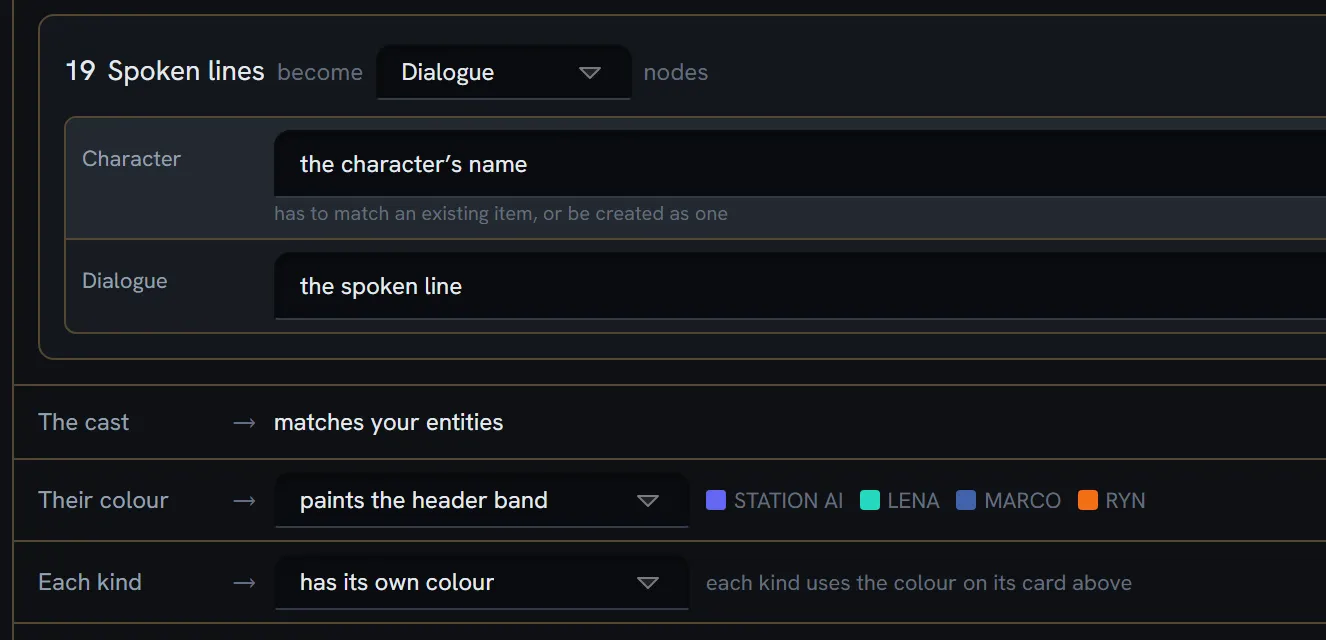
Every speaker is matched against every entity in the project. Not against one collection you nominate, and not against whichever kind of node you routed the lines to — a script’s cast is a property of the script.
Matching is by name, in this order: an exact name, then the entity’s code, then a single content word. A tie is not a match: as soon as two entities qualify on that last rule, the cue is left unmatched and reported, rather than resolved to whichever came first.
| Where it looks | Every entity, in every collection |
| What it decides | Which entity a line’s speaker refers to, what the preview draws, and which characters add the missing ones would create |
| What it does not decide | Whether the match is written as a reference or as the literal name — that is the routing’s job |
Entities are optional. A speaker can go to an entity reference field or to a plain or rich-text field holding the literal name; requiring an entity per character was considered and rejected. With the name going to a text field the cast is still matched — the preview still names the speaker, and the colours still land — the line simply carries text instead of a reference.
The controls
One surface, not a wizard.
Empty state — Bring a script in, with Every scene becomes its own board, named after its slug line. Drop a .fdx or .fountain file here, or choose one. The whole panel is a drop target.
Loaded — Choose another script and Clear, plus a line reading Final Draft · N scenes or Fountain · N scenes.
Left column: two tabs
Scenes. Select all / Select none, a Only scenes with dialogue filter with a count, and a Table / Cards toggle. Every scene is selected by default.
Board grouping. How scenes are gathered into boards:
| Option |
|---|
| Every 2 / 3 / 5 / 10 pages |
| Every 2 / 3 / 5 / 10 scenes |
| The writer’s sections |
| One board per scene |
Plus Merge boards under and Split boards over thresholds. The default is every 5 pages, chosen from a corpus of over twelve thousand scripts rather than by taste.
Routing. Each part of a script is routed to a node type and a field:
Scene names · Sequence notes · Spoken lines · Description · Transitions · Shots · Other lines
The routing is derived automatically from your project’s own node types, and a routing you like can be saved as a named preset in the project’s settings.
Right column: a live preview
It mounts the real canvas and runs the real planner and writer into a throwaway document. It is not a mockup of the result; it is the result, discarded.
The action bar
A Layout choice — Vertical or Horizontal — and then Import N boards.
Afterwards: a result line, Open the first scene, how many characters were created, and any warnings.
Nothing is lost silently
Before you press the button, the panel lists what it could not use: what the file named that TaleShard cannot read — in the file’s own spelling — what you chose not to route, and every unrouted piece of data.
What is not read
Fountain: synopses (=), page breaks (===), and dual dialogue — the marker is stripped and
both speakers appear in sequence. Sections (#) are not elements; they survive only as the input to
the writer’s sections grouping mode.
Final Draft: Singing (reported by name rather than guessed at), revision marks, colours, fonts,
strikeout, dual dialogue, and the cast list. That last one is deliberate: the file’s cast list is
autocomplete history, not a roster — in the reference script it holds 66 entries against 81 real
character cues, polluted with transition text and a typo.
Two other doors
- The Documents section’s importer accepts these extensions too — but produces a prose document, not boards.
- The AI board generator recognises a Fountain or Final Draft document and, when you leave its instructions empty, converts it deterministically, with no model call — so that path costs no AI credits.
Limits
Nothing caps scenes, boards or characters. The only gate is the Pro plan requirement.
What breaks
| Situation | What happens |
|---|---|
A .pdf | Not accepted. There is no PDF path. |
| A screenplay imported as a Document | Plain body text, no scenes and no boards |
| An element type the parser does not know | Dropped and reported in the pre-import summary |
| A part you did not route | Listed before you import, with what it holds |
| Dual dialogue | Both speakers appear in sequence, not side by side |
| A board that cannot be created | Reported, not thrown — the rest of the import proceeds |
| You want it back out as a script | Not possible. There is no export. |